
Managing customer payments, tracking outstanding balances and maintaining daily business accounts can become challenging for retailers, wholesalers, distributors and small business owners. Traditional paper registers and manual bookkeeping often make it difficult to track who owes money, how much payment has been received and which customers need a payment reminder.
DataBridge CRM VyaparDairy (Digital Khata) is designed to simplify customer ledger management, udhaar-jama tracking, transaction records and payment follow-ups in one digital workflow.
Whether you run a retail shop, wholesale business, distribution company or service-based business, a digital khata system can help you organize customer accounts and get better visibility into your business transactions.
What Is Digital Khata Software?
Digital Khata Software is a digital solution for maintaining customer account records, credit transactions, payments received and outstanding balances. Instead of depending entirely on handwritten registers, businesses can maintain customer-wise transaction histories and review payment information through a digital interface.
A digital khata system can help business owners answer important questions:
- Which customers have outstanding payments?
- How much udhaar has been given to each customer?
- How much jama or payment has been received?
- Which transactions are pending or settled?
- Which customers need payment follow-ups?
- How can daily cash flow be monitored more efficiently?
With DataBridge CRM VyaparDairy, businesses can organize customer ledgers and transaction records in a centralized digital workspace.
Key Features of DataBridge CRM VyaparDairy
1. Customer Ledger and Digital Khata Management
A customer ledger records the financial transactions associated with an individual customer. It helps businesses maintain a clear view of credit, debit, payments and outstanding balances.
Using a digital customer ledger, businesses can organize customer accounts, search for records and review transaction histories without repeatedly checking multiple paper registers.
Relevant keywords: Customer Ledger Software, Digital Khata Book, Customer Account Management Software, Online Khata Management.
2. Udhaar and Jama Tracking
Keeping track of udhaar given and payments received is essential for businesses that sell products or services on credit.
A digital udhaar-jama tracking system helps business owners review how much credit has been recorded, how much money has been received and what balance remains outstanding.
DataBridge CRM VyaparDairy presents customer transaction information and balance indicators to help users review their account activity.
This can be especially useful for retail shops, wholesalers, distributors and businesses that regularly manage customer credit.
Relevant keywords: Udhaar Jama Software, Digital Udhaar Khata, Credit and Debit Tracking Software, Outstanding Payment Tracker.
3. Transaction and Balance Tracking
Maintaining accurate transaction records helps businesses understand their financial position with individual customers.
A digital ledger can organize transactions by customer, amount, date and transaction type. This makes it easier to review previous entries, identify outstanding balances and follow up when payments are due.
A well-maintained transaction history also helps reduce confusion during customer payment discussions.
Relevant keywords: Business Transaction Tracking Software, Customer Balance Management, Digital Ledger Software, Payment Tracking System.
4. Payment Recovery and WhatsApp Payment Reminders
Following up on overdue payments can consume valuable time, especially when a business has many customers.
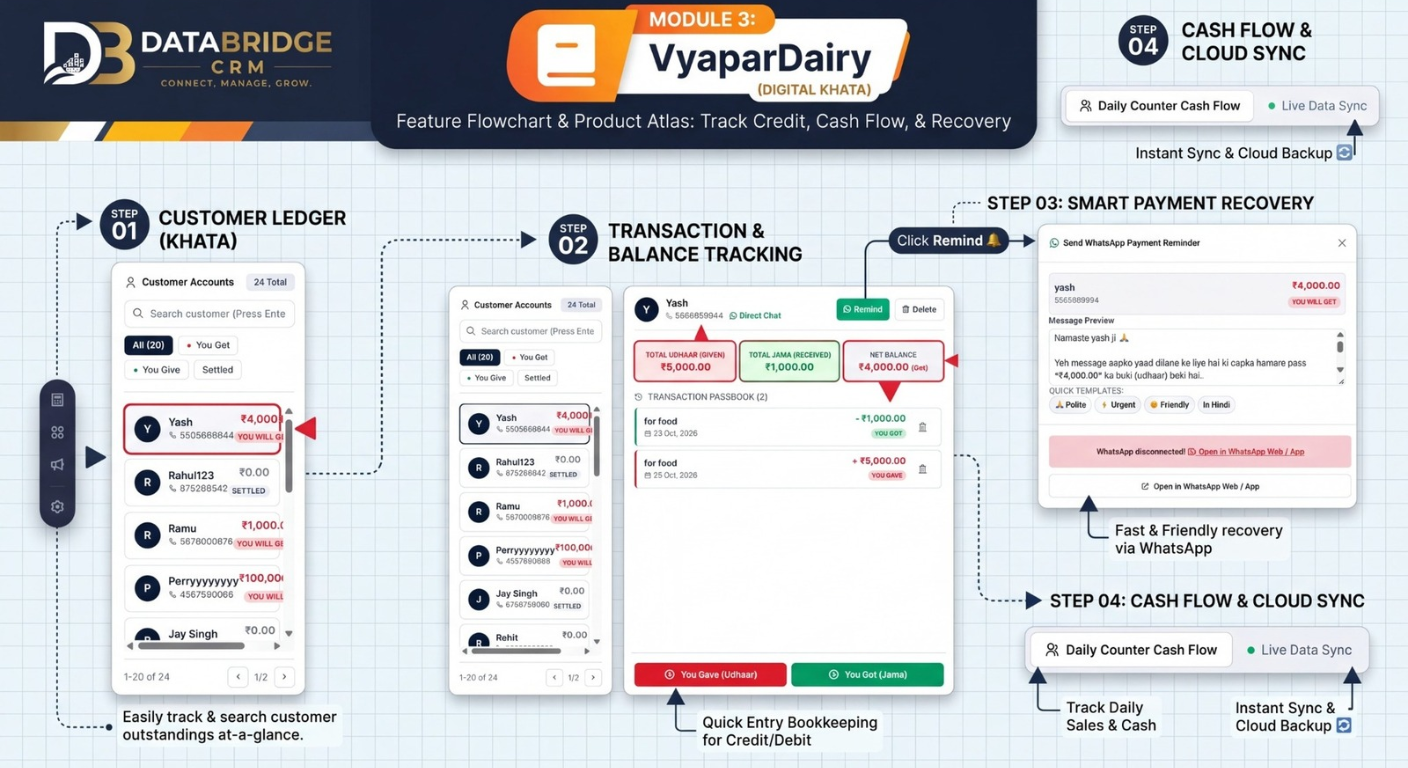
DataBridge CRM VyaparDairy's illustrated workflow includes a WhatsApp payment reminder interface. It provides a way to prepare customer payment reminders and open WhatsApp Web or the WhatsApp application to continue the communication.
A clear, polite reminder can help businesses communicate outstanding amounts and encourage customers to review their pending payments.
For example, a business can send a message such as:
“Hello, this is a friendly reminder that your account has an outstanding balance of ₹4,000. Please review your account and let us know when we can expect the payment. Thank you.”
Always verify the customer's balance before sending a reminder. WhatsApp connectivity, message delivery and any automation depend on the configured integration and applicable platform requirements.
Relevant keywords: WhatsApp Payment Reminder Software, Payment Recovery Management, Udhaar Recovery Software, Outstanding Payment Reminder, Customer Payment Follow-Up.
5. Daily Cash Flow Management
Cash flow management means monitoring the money coming into and going out of a business.
When business owners record customer payments and transactions consistently, they can better understand daily collections and outstanding amounts.
The VyaparDairy interface illustrates a Daily Counter Cash Flow feature for reviewing cash-related business activity.
A consistent daily process can include:
- Recording payments received.
- Updating customer ledger entries.
- Reviewing credit and debit transactions.
- Checking outstanding customer balances.
- Reconciling recorded transactions with actual collections.
These practices can improve financial visibility and help business owners make more informed operational decisions.
Relevant keywords: Cash Flow Management Software, Daily Cash Flow Tracking, Business Cash Management, Daily Sales and Collection Tracking.
6. Cloud Sync and Digital Record Access
Businesses increasingly need their records organized digitally rather than scattered across paper registers and individual files.
Cloud-based systems can help centralize business information and support access across compatible devices, depending on the software configuration.
The illustrated DataBridge CRM workflow highlights Live Data Sync and Cloud Backup. Availability, synchronization behavior and backup coverage should be confirmed for the account's actual configuration.
Keeping business records organized can make routine account reviews and team coordination more convenient.
Relevant keywords: Cloud-Based Accounting Software, Cloud Data Sync, Online Business Records, Digital Bookkeeping Software.
Benefits of Digital Khata Software for Small Businesses
Reduce Dependence on Paper Registers
Digital records provide an alternative to maintaining every customer account manually in a notebook. Businesses can search and review information in a more structured way.
Improve Visibility Into Outstanding Payments
Customer-wise balances make it easier to identify which accounts require attention and plan payment follow-ups.
Organize Customer Transaction Histories
A centralized ledger helps users review recorded transactions and understand how a customer's balance has changed over time.
Make Payment Follow-Ups More Organized
Payment reminder workflows can help businesses prepare consistent messages and reduce the effort involved in routine follow-ups.
Support Better Daily Financial Monitoring
Recording cash-related transactions regularly helps business owners review collections, pending payments and account activity.
Who Can Use Digital Khata and Udhaar Tracking Software?
A digital khata solution can be useful for many types of businesses, including:
- Retail shops: Track customer credit and payments.
- Wholesale businesses: Organize customer-wise outstanding balances.
- Distributors: Review credit transactions and collection follow-ups.
- Small businesses: Maintain customer accounts digitally.
- Service providers: Record customer payments and pending balances.
- Local traders: Replace or supplement manual khata registers with digital records.
The exact suitability depends on each business's accounting workflow, transaction volume and required integrations.
Digital Khata Book vs. Traditional Paper Khata
| Feature | Paper Khata | Digital Khata Software |
|---|---|---|
| Customer account records | Handwritten | Digitally organized |
| Searching old transactions | Manual lookup | Search tools may be available |
| Balance tracking | Manual calculation or entry | Software-supported tracking |
| Payment follow-ups | Manual communication | Reminder workflows may be available |
| Record access | Physical register | Access depends on device and system setup |
| Backup | Physical copies or manual copies | Cloud backup may be available, depending on configuration |
A digital system still requires accurate transaction entry, periodic reconciliation and suitable access controls.
How to Choose the Right Digital Khata Software
Before selecting a digital khata or customer ledger solution, consider these important factors:
- Customer ledger management: Can you review individual customer accounts and transaction histories?
- Udhaar-jama tracking: Does it support the credit and payment workflows your business needs?
- Payment reminders: Can you prepare and manage customer follow-ups conveniently?
- Cash flow visibility: Can you review relevant daily collection and transaction information?
- Data security: Are user permissions, backups and data protection practices appropriate for your business?
- Ease of use: Can your team maintain records without an unnecessarily complicated process?
- Integration requirements: Does the system support the messaging, accounting or business tools you actually use?
Choose software based on verified features, pricing, support and your business requirements.
Why Consider DataBridge CRM VyaparDairy?
DataBridge CRM VyaparDairy brings together digital customer account management, transaction tracking and payment follow-up workflows in a single interface.
The illustrated module focuses on four key areas:
- Customer Ledger (Khata)
- Transaction and Balance Tracking
- Smart Payment Recovery
- Cash Flow and Cloud Sync
For businesses that regularly manage udhaar, jama and customer payment follow-ups, these workflows provide a structured starting point for digitizing day-to-day account management.
To evaluate whether VyaparDairy fits your business, review the available features, account configuration and integration requirements.
Frequently Asked Questions (FAQs)
1. What is the best digital khata software for small businesses?
The best digital khata software depends on your business size, customer credit workflow, reporting requirements, budget and integration needs. Look for customer-wise ledgers, transaction history, outstanding balance tracking and reliable data management.
2. How can I track udhaar and jama online?
Use a digital ledger that allows you to record credit transactions and payments received against the relevant customer account. Review balances regularly and reconcile them with actual transactions.
3. Is digital khata software useful for retail shops?
Yes. Retailers who provide credit to regular customers can use digital khata tools to organize customer balances, review transaction histories and manage payment follow-ups.
4. How can I remind customers about pending payments on WhatsApp?
Verify the outstanding balance, prepare a polite message and send it using the WhatsApp workflow available in your business software. Confirm that the integration is configured and complies with applicable WhatsApp policies.
5. What is customer ledger software?
Customer ledger software helps businesses organize transactions and balances associated with individual customers. It can make account reviews and outstanding payment tracking easier.
6. What is cash flow management software?
Cash flow management software helps businesses record or monitor incoming and outgoing money, depending on the product's features. Accurate records and regular reconciliation remain important.
7. Can digital khata software replace accounting software?
Not always. A digital khata tool may focus on customer ledgers and credit tracking, while full accounting software can include tax records, financial statements, bank reconciliation and other accounting functions. Check the product's actual capabilities before replacing an existing system.
8. Does DataBridge CRM VyaparDairy support WhatsApp reminders and cloud sync?
The provided VyaparDairy interface illustrates WhatsApp payment reminders and live data sync/cloud backup. Confirm the availability, setup and limitations of these functions in your specific account.
Conclusion
Managing customer credit, pending payments and daily transactions becomes more organized when business records are maintained consistently.
DataBridge CRM VyaparDairy (Digital Khata) illustrates a practical workflow for customer ledger management, udhaar-jama tracking, payment reminders and cash flow visibility.
If you are searching for digital khata software, online udhaar tracking, customer ledger management or payment recovery tools, evaluate these capabilities against your daily business needs and choose a solution that supports accurate records and responsible data management.
Explore DataBridge CRM
Explore digital khata management with DataBridge CRM and find a workflow that suits your business.

