
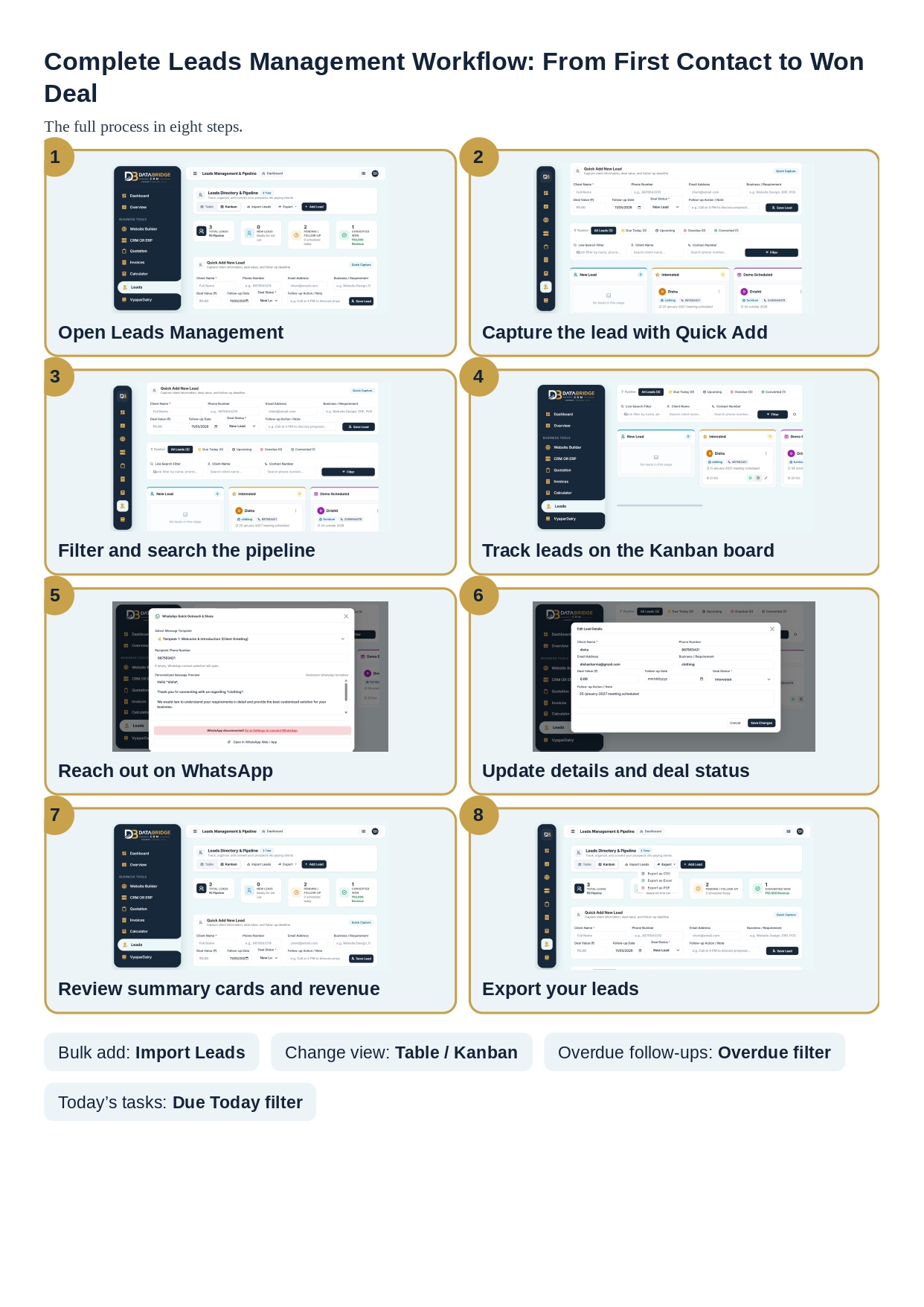
Managing customer enquiries, tracking potential buyers and following up with prospects are essential parts of every growing business. However, when lead information is scattered across notebooks, spreadsheets, phone contacts and messages, it becomes difficult to maintain an organised sales process. Missed follow-ups, incomplete customer details and delayed communication can affect business growth.
DataBridge CRM Lead Management helps businesses organise their leads, monitor sales opportunities and manage customer communication from a centralised workspace. With features such as lead creation, pipeline management, follow-up tracking, WhatsApp outreach and lead status updates, businesses can maintain better visibility over their sales activities.
Whether you run a small business, service company, sales team or growing organisation, an organised lead management system can make customer handling more structured and efficient.
What Is Lead Management and Why Does Your Business Need It?
Lead management is the process of collecting, organising, tracking and managing potential customers from their first enquiry to the final sales decision. Every enquiry represents a possible business opportunity, but converting that opportunity requires timely communication and consistent follow-ups.
A proper lead management system helps businesses maintain customer information, understand the current status of every enquiry and identify which prospects require attention.
Without an organised system, sales teams may face common challenges such as:
- Difficulty tracking new customer enquiries.
- Missing important follow-up dates.
- Losing customer contact information.
- Not knowing which leads are interested or ready to purchase.
- Limited visibility into the overall sales pipeline.
- Difficulty coordinating communication across team members.
DataBridge CRM Lead Management provides a structured way to manage these activities and keep important lead information accessible.
Centralised Lead Management for Better Business Organisation
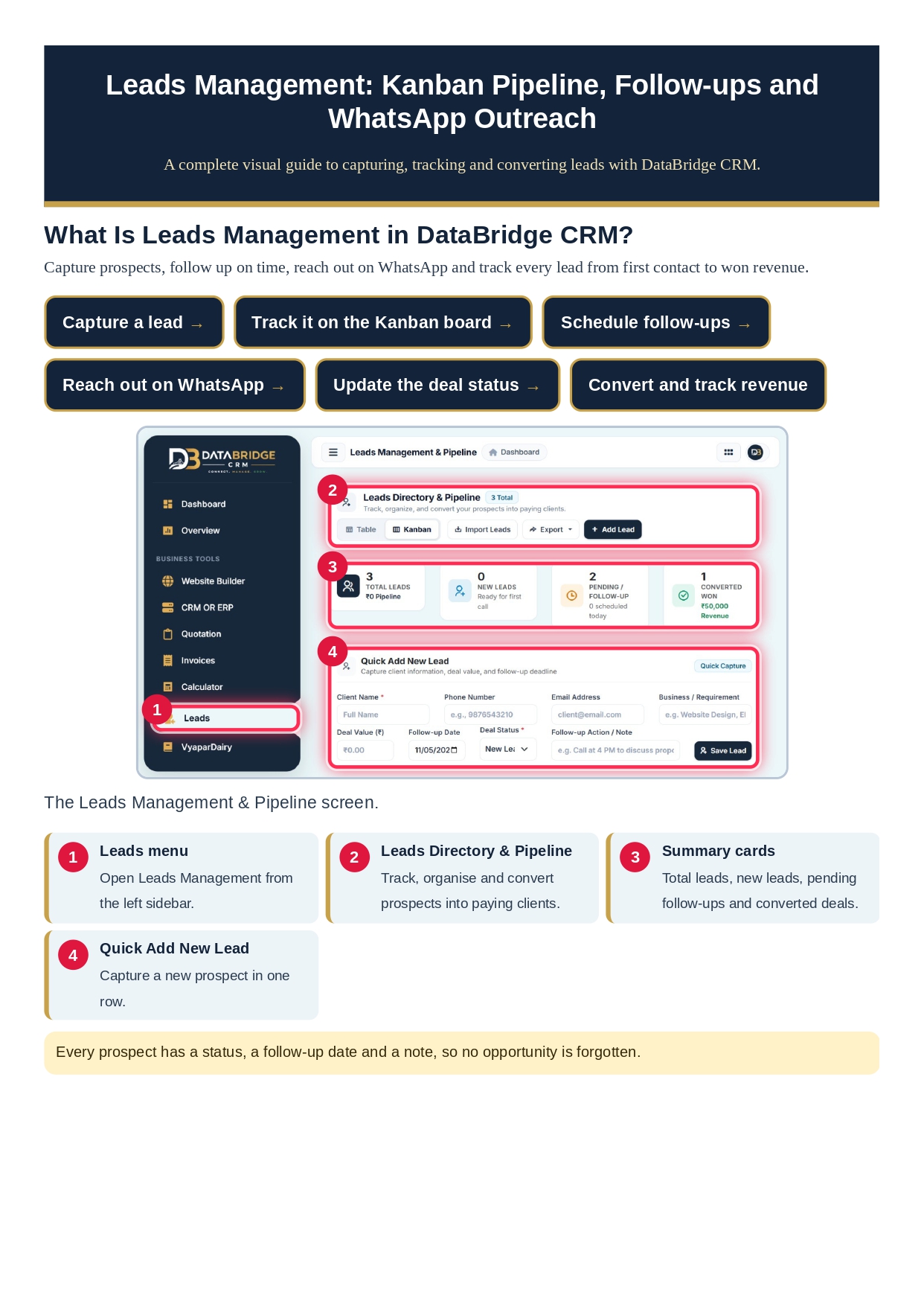
One of the important aspects of effective CRM software is keeping customer and prospect information organised in one place. DataBridge CRM provides a dedicated Leads Management workspace where businesses can view and manage their lead records.
Instead of maintaining separate lists for customer names, phone numbers, requirements and follow-up dates, users can manage these details through a centralised lead directory.
This organised approach makes it easier to review enquiries, update lead information and understand the progress of potential customers. It also helps sales teams spend less time searching for information and more time communicating with prospects.
Table View and Kanban View for Flexible Lead Tracking
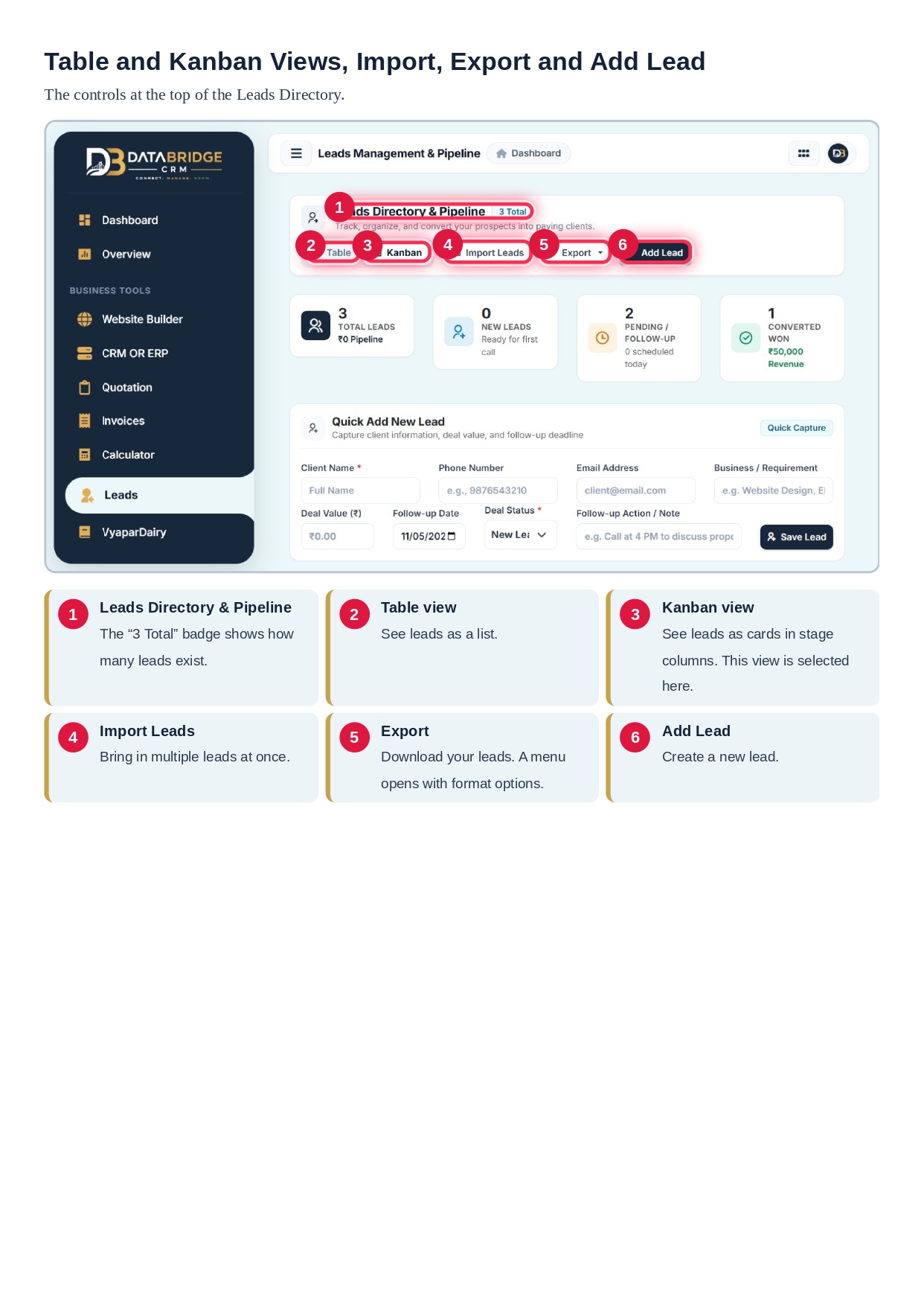
Different businesses prefer different ways of managing their sales activities. Some teams need a detailed list of customer records, while others prefer a visual overview of their sales pipeline.
DataBridge CRM Lead Management provides two useful ways to view lead information:
Table View
The Table View presents lead information in an organised directory format. It is useful when businesses need to review multiple customer records, search for information or manage their lead database in a structured layout.
Kanban View
The Kanban View presents leads as visual cards arranged according to their current status. This makes it easier to understand how prospects are progressing through different stages of the sales pipeline.
For example, leads can be organised into categories such as New Lead, Interested and Demo Scheduled. This visual arrangement helps teams identify which opportunities are progressing and which require further communication.
Understand Your Sales Performance with Lead Summary Cards
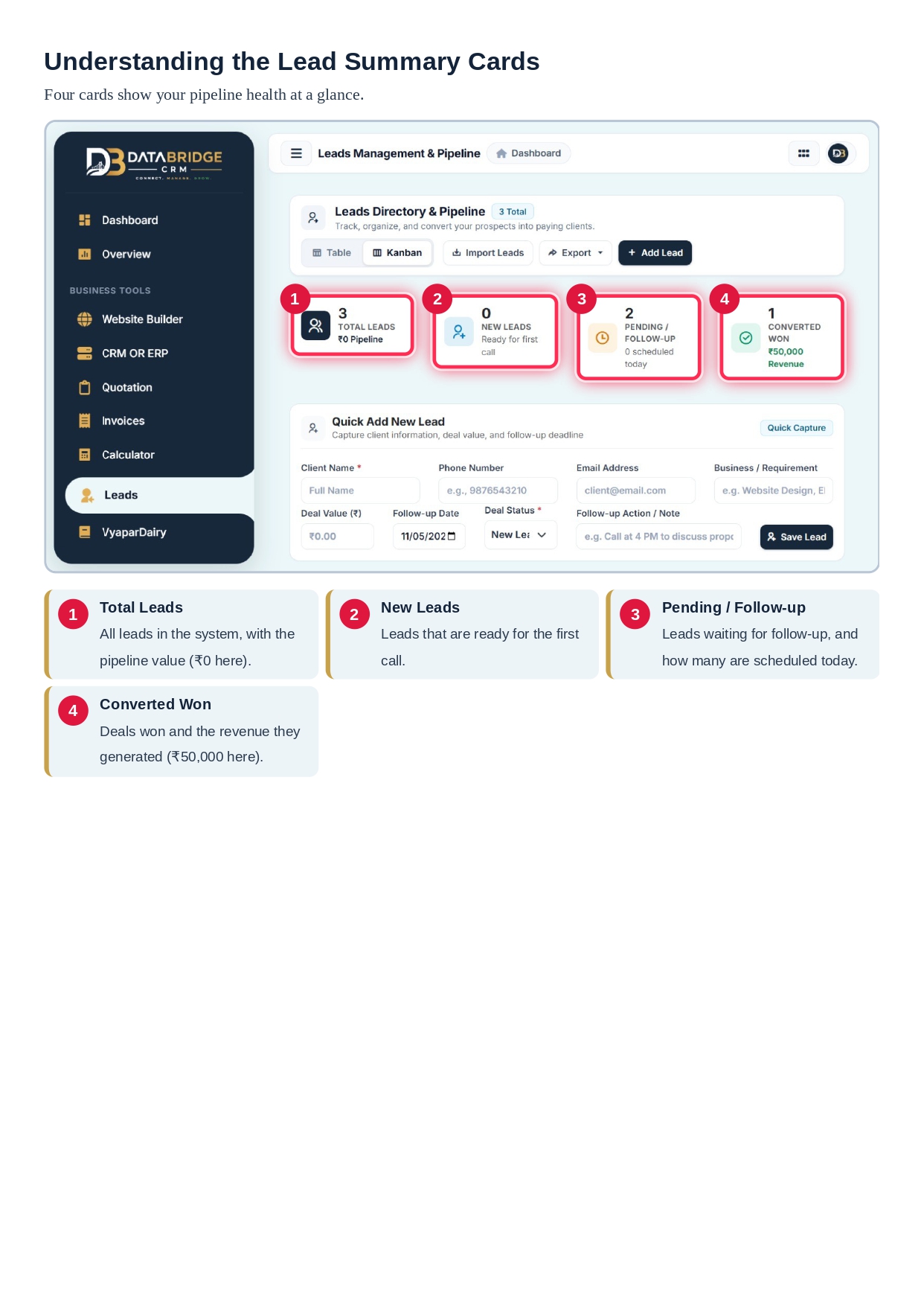
Having access to an organised lead database is useful, but businesses also need a quick overview of their sales activities. DataBridge CRM includes summary cards that help users understand important lead information at a glance.
The lead dashboard highlights categories such as:
- Total Leads: Provides an overview of the total number of leads recorded in the system.
- New Leads: Helps identify recently added customer enquiries.
- Pending / Follow-up: Highlights leads that still require attention or further communication.
- Converted Won: Shows leads that have successfully reached the converted or won stage.
These summary indicators make it easier for businesses to review their lead pipeline and understand the current status of sales opportunities without checking every individual record.
Quick Add New Lead: Capture Customer Enquiries Easily
Capturing accurate customer information is the foundation of successful lead management. When a new enquiry arrives, businesses need a simple way to record the prospect's details before important information gets missed.
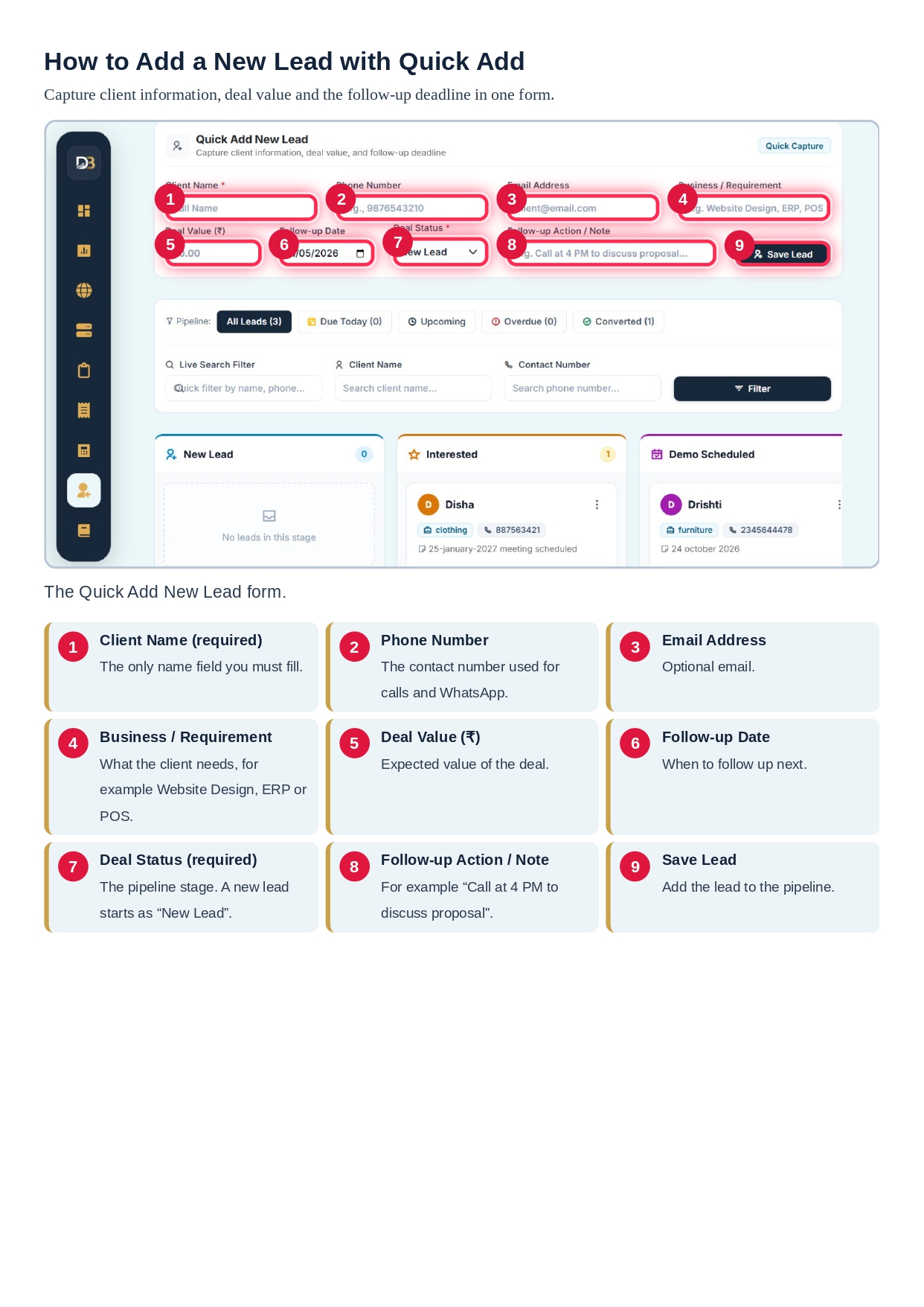
DataBridge CRM provides a Quick Add New Lead form that allows users to create lead records by entering relevant information, including:
- Client Name: Records the name of the potential customer.
- Phone Number: Stores the contact number for future communication.
- Email Address: Keeps the customer's email information available.
- Business / Requirement: Describes the product, service or business requirement.
- Deal Value: Records the estimated value of the sales opportunity.
- Follow-up Date: Helps schedule the next communication.
- Deal Status: Identifies the current stage of the lead.
- Note: Stores additional details or important conversation notes.
Once the required information is entered, users can save the lead and maintain a record for future sales activities. Capturing these details in one place supports better customer data management and more organised follow-ups.
Smart Lead Filters and Live Search for Faster Access
As a business grows, its lead database can contain hundreds or even thousands of records. Finding a particular customer manually can become time-consuming.
DataBridge CRM includes search and filtering options that help users locate relevant leads more efficiently.
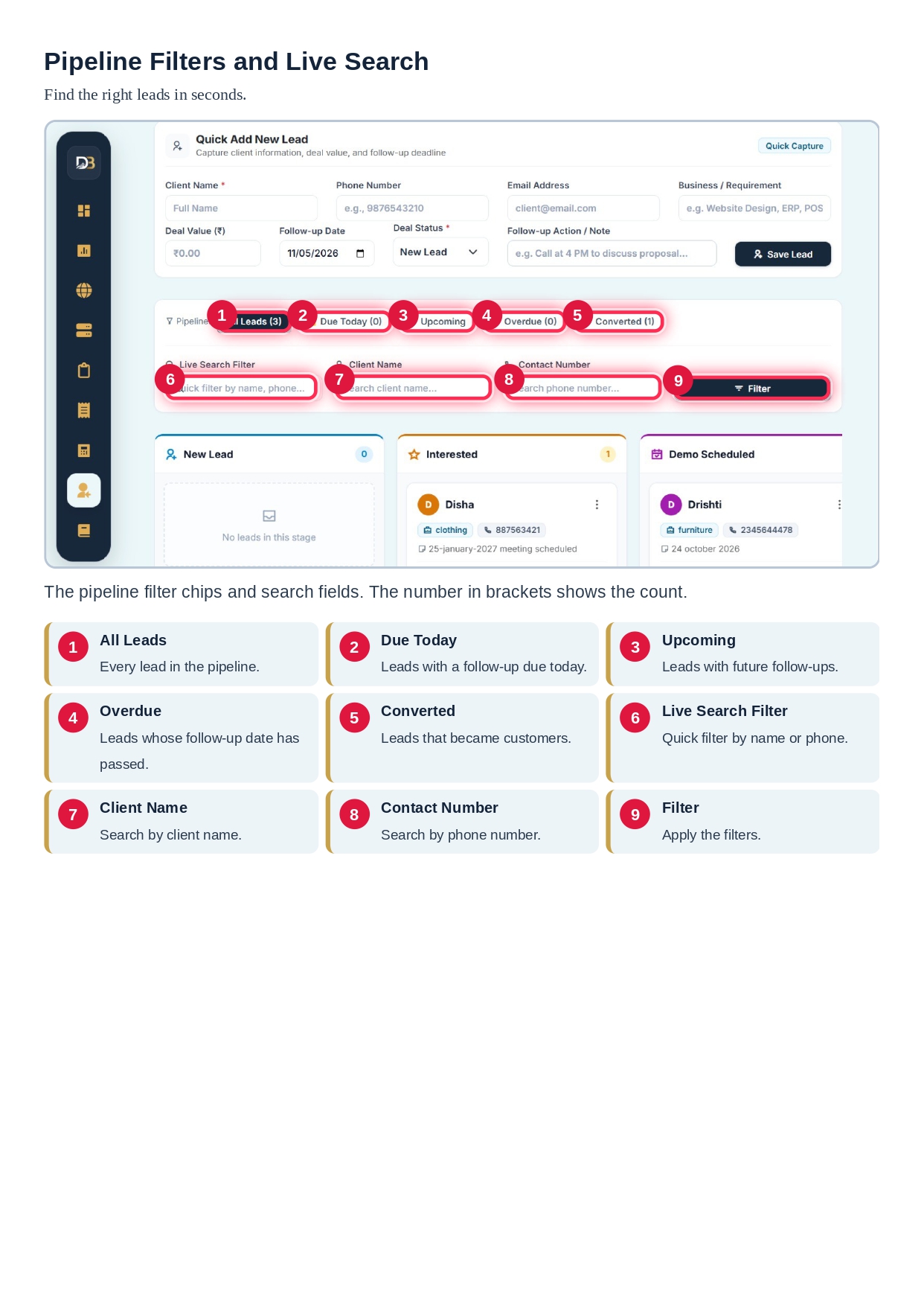
Users can organise their lead records using filters such as:
- All Leads: Displays the complete lead directory.
- Due Today: Helps identify leads scheduled for follow-up today.
- Upcoming: Shows leads with future follow-up dates.
- Overdue: Helps locate leads whose follow-up dates have passed.
- Converted: Helps review leads that have been converted.
The live search functionality also makes it easier to find customer records using details such as the client's name or phone number. These options help sales teams prioritise communication and reduce the chances of overlooking important enquiries.
Visual Sales Pipeline: Track Every Lead's Progress
A sales pipeline provides a clear view of where each potential customer stands in the buying journey. Without a visible pipeline, it can be difficult to understand which prospects are new, which have shown interest and which are ready for the next stage.
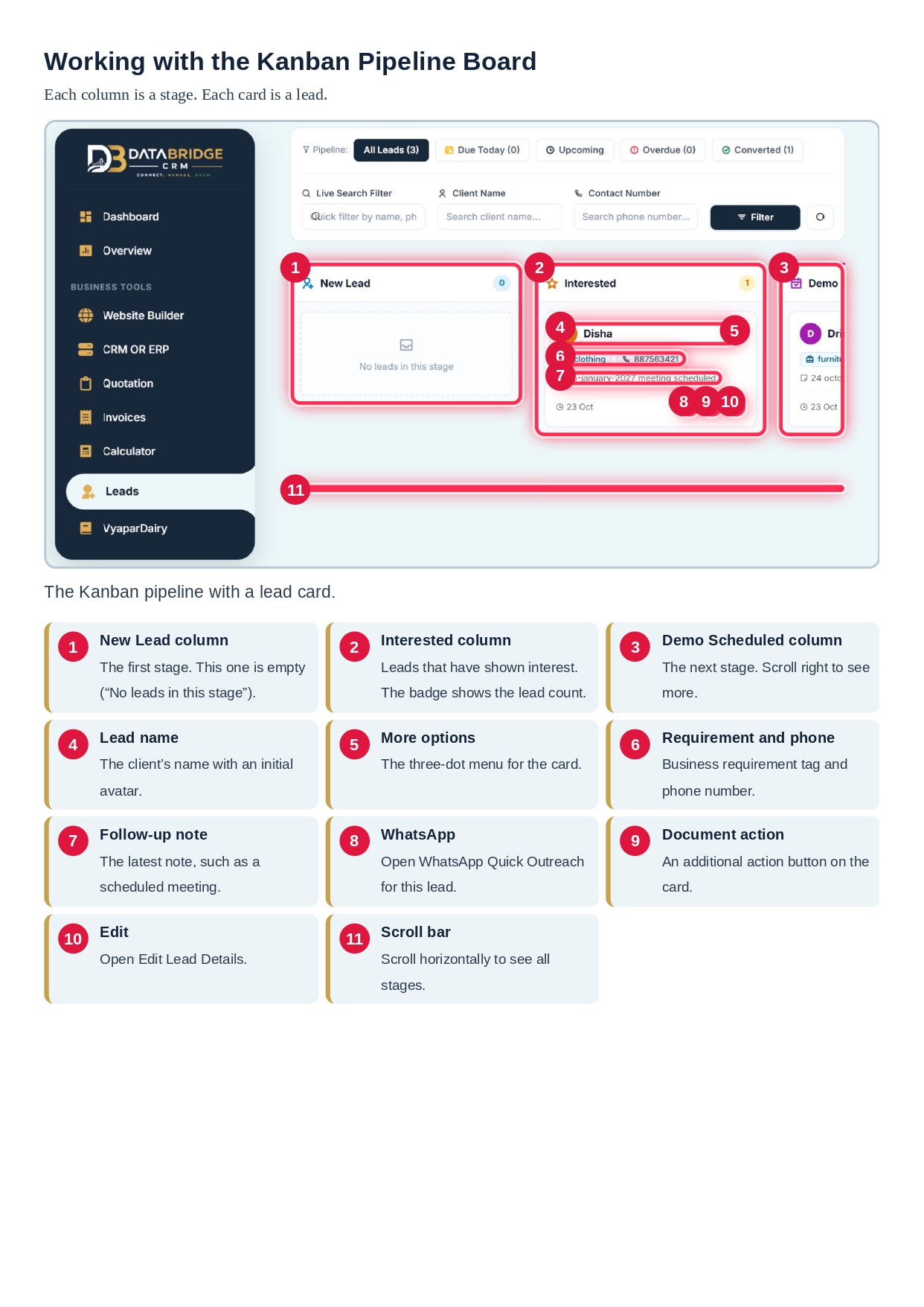
With the Kanban pipeline in DataBridge CRM, leads appear as individual cards under their respective deal-status columns.
For example, the pipeline can include stages such as:
- New Lead: Newly captured enquiries that need initial communication.
- Interested: Prospects who have shown interest in the product or service.
- Demo Scheduled: Leads for which a product demonstration or meeting has been planned.
Lead cards can display useful information such as customer names, contact numbers, requirements and follow-up notes. Users can also access available actions for communication, document handling and editing lead details.
This visual pipeline helps businesses understand their sales progress and identify opportunities that need immediate attention.
WhatsApp Quick Outreach for Faster Customer Communication
Quick and convenient communication plays an important role in converting enquiries into customers. Many businesses use WhatsApp to respond to prospects, share information and maintain customer relationships.
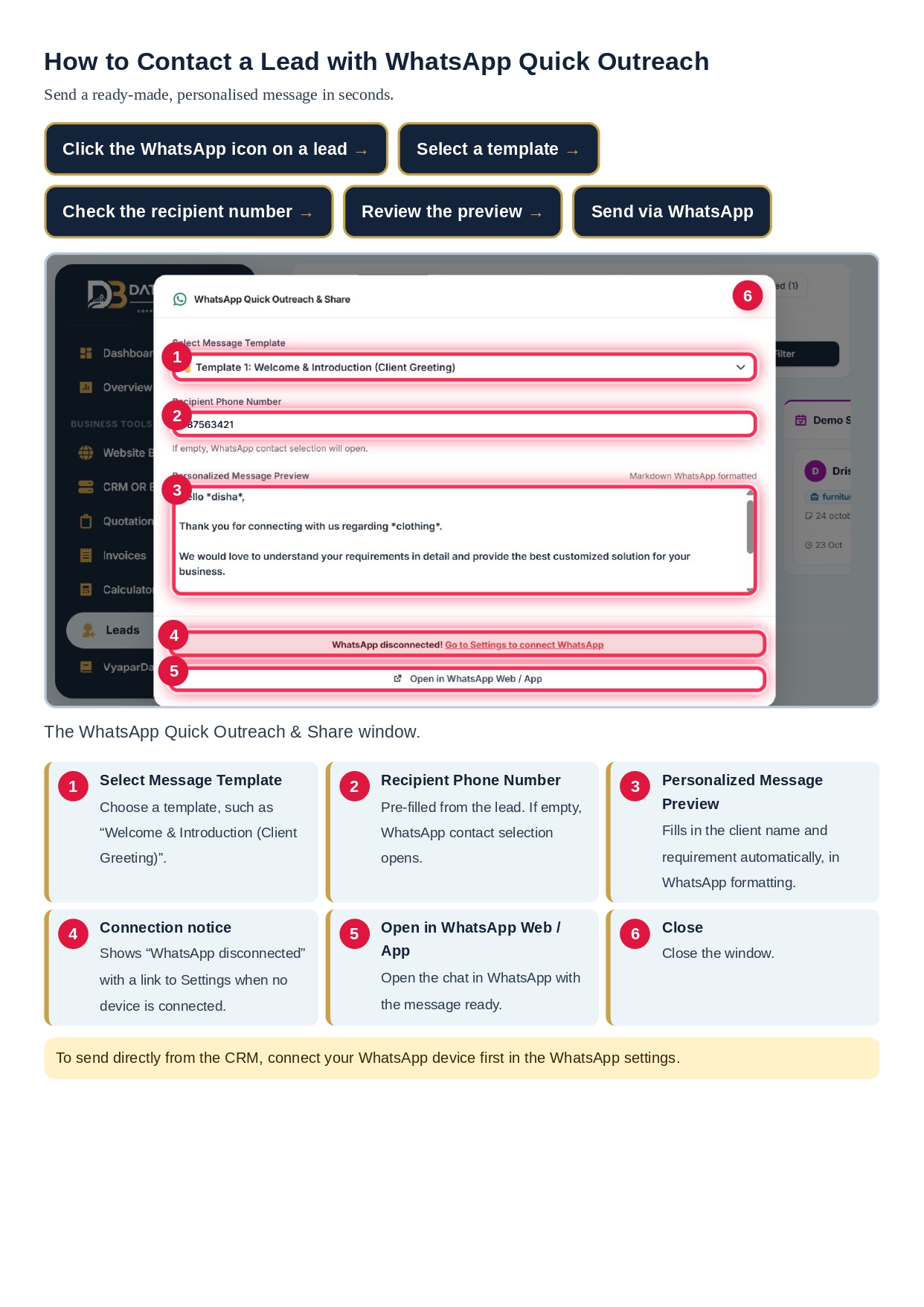
DataBridge CRM includes a WhatsApp Quick Outreach feature that supports a more convenient communication workflow.
Users can select a message template, enter or review the recipient's phone number and view a personalised message preview before opening WhatsApp Web or the WhatsApp application.
This functionality can help businesses:
- Communicate with potential customers more conveniently.
- Prepare messages using available templates.
- Personalise communication before sending.
- Reduce the effort involved in repeatedly preparing similar messages.
- Maintain more consistent customer follow-ups.
The WhatsApp device or application needs to be connected as required before using the outreach functionality. For businesses interested in broader WhatsApp communication solutions, explore the DataBridge WhatsApp Marketing Tool.
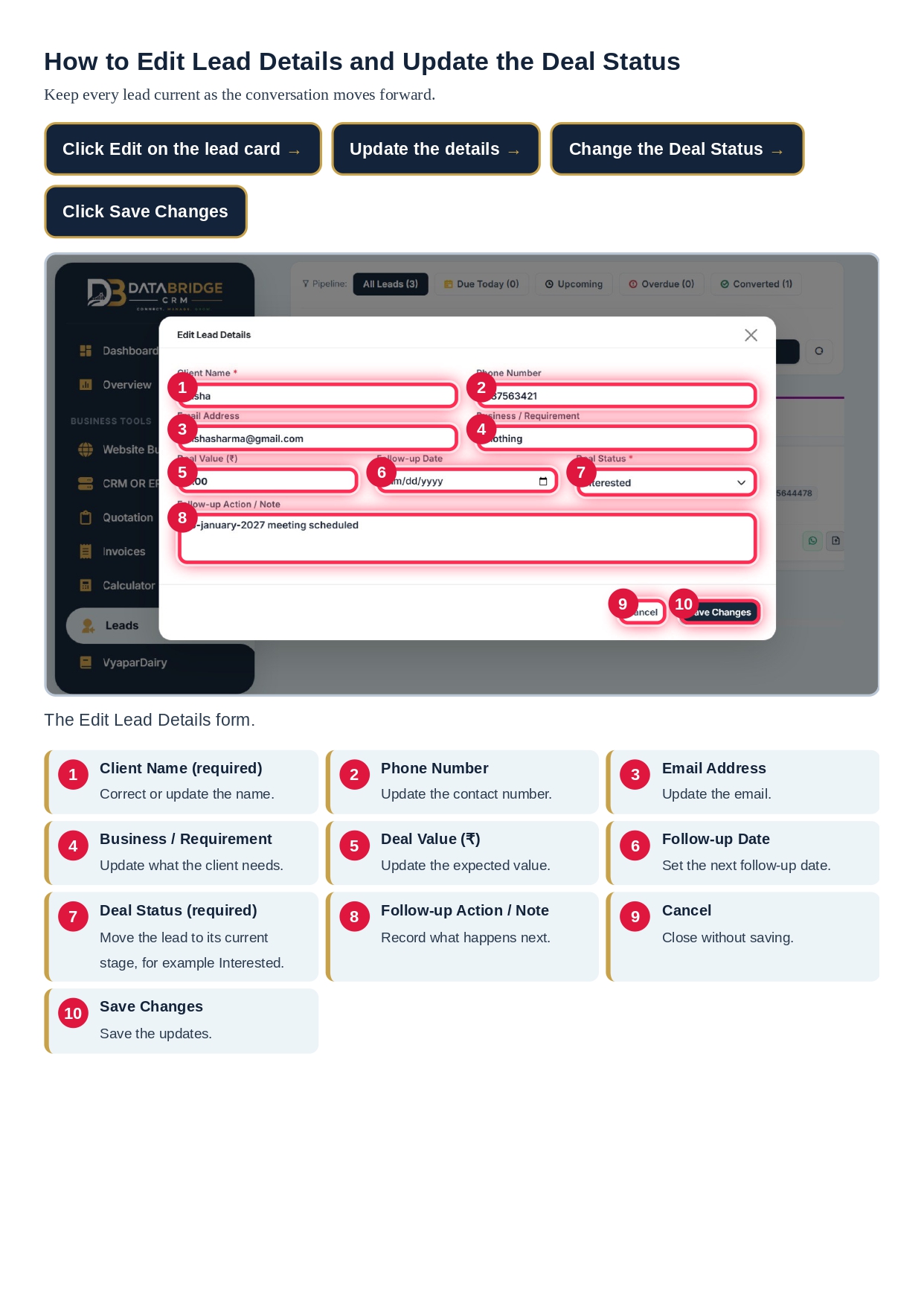
Edit Lead Details and Keep Customer Records Updated
Customer information and sales requirements can change over time. A prospect may update their contact details, discuss a different requirement, change their expected deal value or request another follow-up date.
Keeping lead information updated is important for maintaining accurate business records.
DataBridge CRM provides an Edit Lead Details option that allows users to update information such as:
- Client name and contact number.
- Email address.
- Business or service requirement.
- Deal value.
- Follow-up date.
- Current deal status.
- Additional notes.
By updating lead records when new information becomes available, businesses can maintain a more reliable view of their sales opportunities and customer interactions.
Import and Export Leads for Convenient Data Management
Businesses may already have customer and prospect information stored in spreadsheets or other digital records. Transferring this information into a CRM system should be a convenient part of the lead management process.
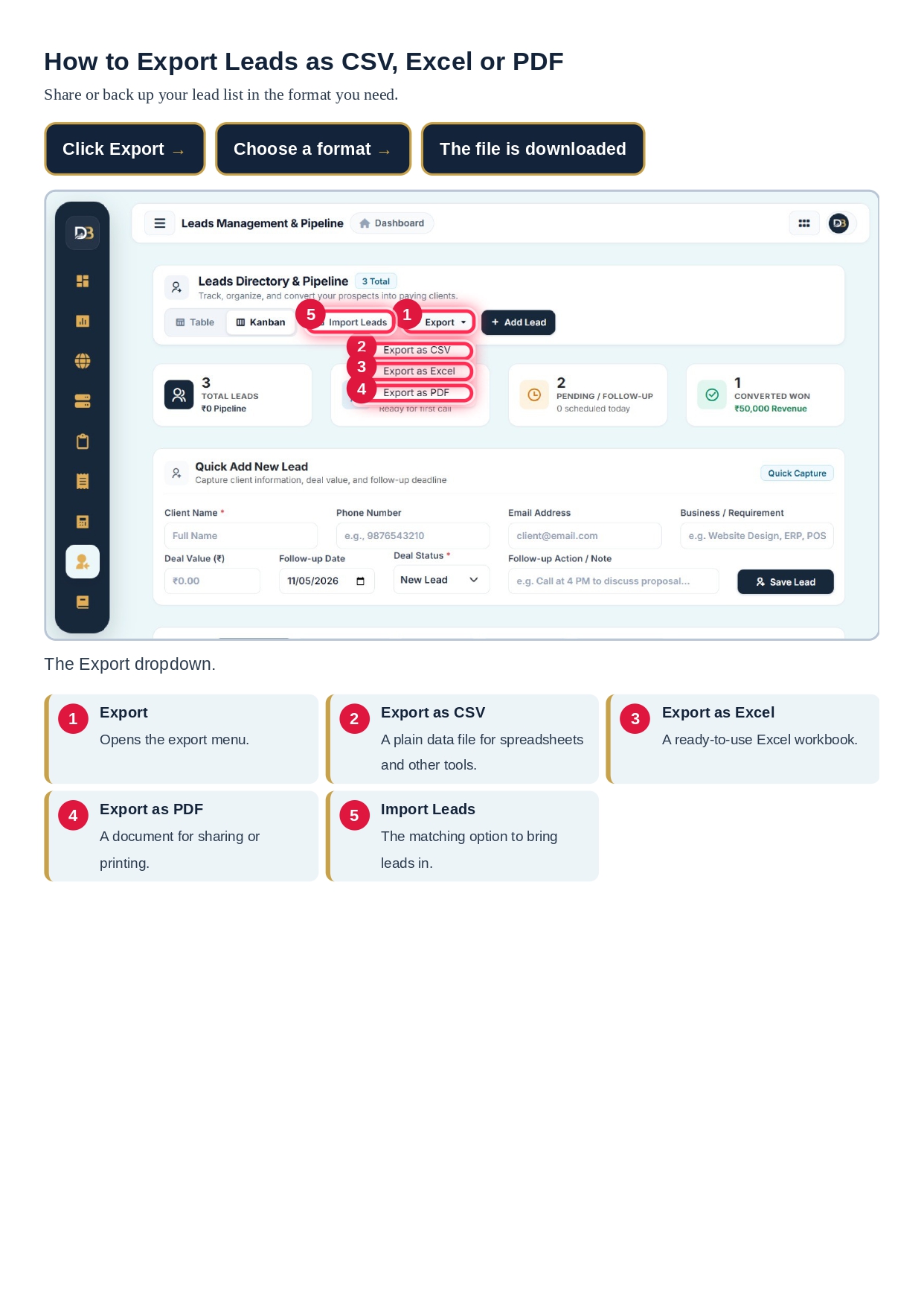
DataBridge CRM provides lead import and export options to support data handling.
The available export formats shown in the Leads Management interface include:
- CSV: Useful for spreadsheet-based data handling and compatibility.
- Excel: Convenient for reviewing and working with lead information in spreadsheet software.
- PDF: Useful for sharing or maintaining a document-style copy of lead information.
The Import Leads option also supports bringing existing lead information into the system. Businesses should review their data and follow the import requirements presented in the application to maintain accurate records.
Lead Management Software vs Customer Ledger Software
Businesses often use different software solutions to manage customer relationships and financial records. Although these systems may work together, their primary purposes are different.
Lead Management Software focuses on potential customers and sales opportunities. It helps businesses capture enquiries, track prospect status, schedule follow-ups and manage the journey from initial interest to conversion.
Customer Ledger Software generally focuses on customer financial records, such as transactions, payments, outstanding balances and account-related information.
For example, a sales team may use DataBridge CRM Lead Management to track a new enquiry and follow up until the customer makes a purchase. After the customer becomes active, a customer ledger system can help manage financial transactions and payment records.
Both types of software support business organisation, but they solve different operational requirements.
Who Can Benefit from DataBridge CRM Lead Management?
Lead management is useful for businesses that receive enquiries and need a structured way to convert them into customers. DataBridge CRM's lead tracking and communication features can support a variety of business activities.
- Sales Teams: Organise prospects, monitor deal stages and manage follow-ups.
- Digital Marketing Agencies: Track enquiries generated through marketing campaigns.
- Service Businesses: Record customer requirements and schedule communication.
- Consultants: Maintain prospect details and monitor potential projects.
- Small Businesses: Replace scattered lead records with a more organised workflow.
- Growing Organisations: Maintain better visibility into sales opportunities as enquiry volume increases.
Key Business Benefits of an Organised Lead Management System
Using a structured lead management process can improve the way businesses handle enquiries and customer communication.
1. Better Lead Organisation
Keep important prospect information in a centralised workspace instead of relying on scattered records.
2. More Consistent Follow-Ups
Follow-up dates and lead filters help teams identify which prospects need attention.
3. Improved Sales Pipeline Visibility
Visual deal stages make it easier to understand the progress of potential customers.
4. Convenient Customer Communication
WhatsApp Quick Outreach supports a more organised approach to preparing customer messages.
5. Easier Lead Information Management
Search, filters, editing and import/export options help businesses work with their lead records more conveniently.
6. More Informed Sales Planning
Lead summary cards provide a quick overview of important sales pipeline categories.
Why Choose DataBridge CRM for Lead Management?
Choosing the right CRM solution is an important decision for businesses that want to improve customer handling and sales organisation. A useful CRM system should make it easier to manage customer information, track opportunities and maintain communication throughout the sales process.
DataBridge CRM brings together lead records, visual pipeline management, follow-up filters, customer communication and data management options in its Leads Management workspace.
Its combination of Table View, Kanban View, lead summary cards, Quick Add forms, WhatsApp Quick Outreach and import/export functionality supports a more organised approach to managing sales enquiries.
To learn more about the platform and its business solutions, visit the official DataBridge CRM website.
Frequently Asked Questions About DataBridge CRM Lead Management
1. What is DataBridge CRM Lead Management?
DataBridge CRM Lead Management is a workspace for recording, organising and tracking potential customers. It supports lead creation, pipeline visibility, follow-up management, WhatsApp outreach and lead record updates.
2. What information can be added to a new lead?
Users can enter details such as client name, phone number, email address, business requirement, deal value, follow-up date, deal status and additional notes.
3. What is the difference between Table View and Kanban View?
Table View displays lead records in a structured directory, while Kanban View displays leads as cards arranged by deal status or pipeline stage.
4. Can I track upcoming and overdue follow-ups?
The Leads Management interface includes filters such as Due Today, Upcoming and Overdue to help users identify leads that require follow-up attention.
5. Does DataBridge CRM support WhatsApp outreach?
Yes. The interface includes WhatsApp Quick Outreach, where users can select a message template, review a personalised preview and open WhatsApp Web or the application. The required WhatsApp connection must be available.
6. Can I update lead information after creating a record?
Yes. The Edit Lead Details option allows users to update customer information, requirements, deal value, follow-up date, deal status and notes.
7. Can I import and export lead information?
The Leads Management interface includes Import Leads and export options for CSV, Excel and PDF formats.
8. What are lead summary cards used for?
Summary cards provide a quick overview of Total Leads, New Leads, Pending or Follow-up leads and Converted Won leads.
9. Is lead management the same as customer ledger management?
No. Lead management focuses on prospects and sales opportunities, while customer ledger management generally focuses on financial transactions, payments and outstanding balances.
10. Which businesses can use lead management software?
Sales teams, agencies, consultants, service providers, startups and small or growing businesses can benefit from organised lead tracking and follow-up management.
Final Thoughts
Managing leads effectively is not just about collecting customer contact details. It is about understanding every prospect's requirements, tracking their progress, maintaining timely communication and building a consistent sales process.
DataBridge CRM Lead Management brings these important activities into an organised workspace with lead creation, Table and Kanban views, pipeline filters, summary cards, WhatsApp Quick Outreach and data import/export options.
For businesses looking to improve lead tracking, organise customer enquiries and create a more structured sales workflow, DataBridge CRM offers useful tools to support their day-to-day operations.
Explore DataBridge CRM: https://databridgecrm.com/
#DataBridgeCRM #LeadManagement #CRMSoftware #LeadManagementSoftware #CustomerManagement #SalesPipeline #SalesManagement #CRMSystem #BusinessManagement #CustomerRelationshipManagement #LeadTracking #LeadGeneration #SalesAutomation #BusinessAutomation #KanbanBoard #KanbanCRM #CustomerEngagement #WhatsAppCRM #WhatsAppOutreach #WhatsAppBusiness #FollowUpManagement #SalesFollowUp #CustomerCommunication #LeadConversion #SalesGrowth #BusinessGrowth #DigitalBusiness #SmallBusinessTools #StartupSolutions #CustomerDataManagement #SalesProductivity #CRMForBusiness #CustomerLedgerSoftware #DigitalTransformation #BusinessTechnology #DataBridge #SalesStrategy #CRMIndia #BusinessSoftware #LeadCapture

