
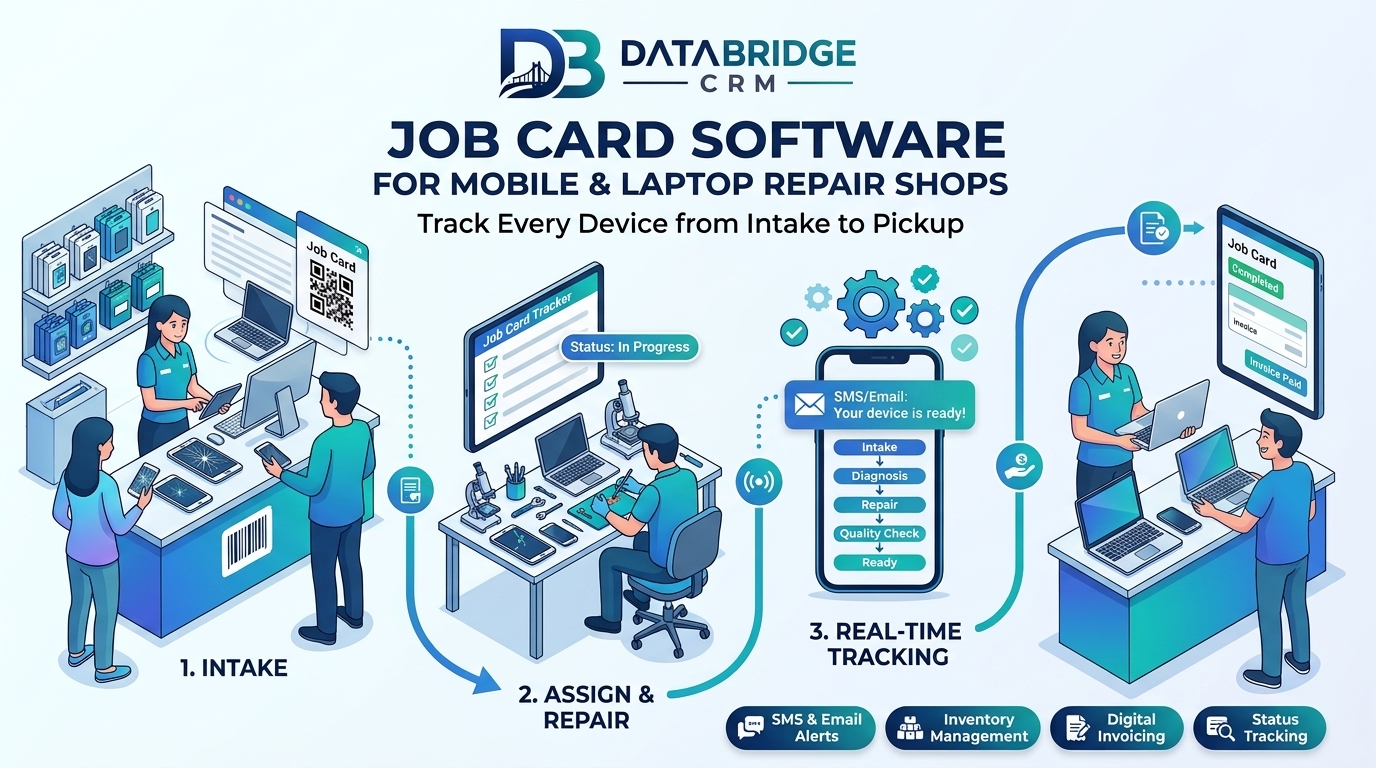
A customer walks in on a Monday with a cracked phone. By Thursday, nobody can say who looked at it, whether the part was ordered, or what price was quoted. The customer calls twice. A technician searches a drawer. The owner promises "today evening" without really knowing.
Repair work is full of small moving parts: devices, accessories, estimates, spare parts, technicians and promises. When these live in a notebook and a few phones, something always slips. A proper job card system makes each device a tracked item with a clear history.
This guide explains what job card software for repair shops should do, how a CRM approach improves customer updates, and how to check which Windows, Android and iOS apps are actually available before you commit.
Where Paper Job Cards and Memory Fail
- Lost or smudged slips. A paper token can disappear, and so can the details on it.
- Disputes about condition. Without a recorded intake note, "it already had a scratch" turns into an argument.
- Silent estimate changes. A new fault found mid-repair is discussed on a call and never written down.
- Parts confusion. Nobody remembers which part is reserved for which device.
- Repeated status calls. Customers phone because nobody tells them when a device is ready.
- Unclear pickup. Devices sit on shelves because the customer was never informed.
The Journey of One Device
Think of each repair as a short journey. Good software records every stop on it:
- Intake: customer details, device, serial number or IMEI, accessories handed over, visible condition, the reported problem and any advance paid.
- Diagnosis: the technician's findings and an estimate.
- Approval: the customer's yes or no, recorded with the date.
- Parts: what is needed, ordered or taken from stock.
- Repair and testing: work done and a final check.
- Ready for pickup: a status the customer is told about.
- Billing and delivery: invoice, payment and handover.
When each of these has a status, the owner can look at one screen and see how many devices are waiting for approval, how many for parts, and how many are ready but not collected.
What Good Job Card Software Should Handle
- Customer and device records with serial number or IMEI
- A printable or shareable job card for the customer
- Intake notes on condition and accessories
- Estimates and approval notes
- Technician assignment and status stages
- Spare parts linked to the job
- Billing with GST where applicable
- Customer updates by SMS or WhatsApp
- Repair history for repeat customers
- Daily and monthly reports
You don't need every extra. You do need the device journey to be visible to everyone who handles it.
How a CRM Approach Helps Repair Shops
A CRM treats the customer as a relationship, not a one-time ticket. That matters in repair, where trust decides whether a customer returns with the next phone, the family laptop or a referral.
DataBridge CRM offers CRM tools for different industries, along with WhatsApp and SMS messaging tools across its platform. If you run a repair or service centre, ask the team during a demo exactly how job cards, status stages, parts and billing are set up in the current service-centre module, and ask to see a sample repair travel from intake to invoice. Visit DataBridge CRM to see the full product list.
A Practical Example: A Busy Saturday in a Mobile Repair Shop
A shop in Jaipur handles around thirty devices on a typical Saturday: screens, batteries, charging ports, a few laptops with slow boot times.
At the counter, the staff member opens a new job card, records the phone's model and IMEI, notes a cracked back panel and a missing SIM tray cover, and prints the card for the customer. The technician sees the new job under his name, finds a faulty charging port, records the estimate and the customer approves by phone. The note is added the same minute.
Mid-afternoon, the part arrives and is linked to the job. By evening the device is tested and marked ready, and a message goes to the customer. On Sunday morning the owner opens the list of ready-but-uncollected devices and sends gentle reminders. Nothing here needs fancy technology. It needs a shared record that people actually update.
Windows, Android and iOS: Check What Is Live
Repair shops work in two modes. The counter needs a stable desktop with a printer for job cards and invoices, while technicians and owners often prefer a phone. The DataBridge website shows download options for Windows, macOS, the App Store and Google Play. Which of these apply to the service-centre module, and which are live today, should be confirmed before you plan rollout.
Ask the team three direct questions:
- Windows: is there a desktop app for the service-centre module that works with our counter, printer and barcode setup?
- Android (APK or Play Store): which Android build or Play Store listing applies, and can technicians use it on the shop floor?
- iPhone and iPad (iOS): is an iOS app available for this module, or only the web version?
Ask for answers in writing during your demo. A web login is a sensible fallback while you wait. You can also check the software downloads page.
Protect Customer Data on Devices
Phones and laptops hold personal photos, messages and banking apps. Treat that seriously:
- Record only the information you truly need for the repair
- Avoid writing down passcodes unless unavoidable, and never leave them on loose paper
- Limit who can view customer records in the software
- Tell customers plainly that their data should be backed up before repair
Benefits by Type of Repair Business
Single-counter mobile shops
Fewer lost slips, fewer status calls and faster billing at the counter.
Laptop and computer service centres
Longer repairs and more parts mean more value in a clear status trail and part-to-job linking.
Multi-brand and multi-branch centres
Owners see all branches' pending jobs in one place and compare turnaround times.
Specialist centres: printers, CCTV, chip-level repair
Complex jobs benefit from detailed technician notes and estimate approvals recorded in the same job card.
How to Choose: A Short Checklist
- Can you create a job card in under a minute at the counter?
- Are device condition and accessories recorded at intake?
- Can estimates and customer approvals be noted against the job?
- Can customers be updated by SMS or WhatsApp?
- Are parts linked to jobs, with stock visible?
- Which platforms are live today: Windows, Android, iOS?
- Can you test a demo with your own sample repairs?
Frequently Asked Questions
What is a job card in a repair shop?
It is the record created when a device arrives. It holds customer details, device information, condition, the problem, estimate, parts, status and billing.
Can customers get repair status updates?
Good systems support this. DataBridge also offers WhatsApp and SMS tools, so ask how they connect to the service-centre module in a demo.
Does DataBridge CRM have an app for Windows, Android and iOS?
The website shows download options, but availability for the service-centre module should be confirmed with the team before rollout.
Is job card software useful for a small one-counter shop?
Yes. Even a small shop benefits from recorded intake notes, clearer estimates and fewer status calls.
Can it handle laptops, printers and CCTV repairs too?
Many service centres handle several device types. Ask the team how fields and statuses can be configured for your mix of repairs.
Conclusion
A repair shop's reputation is built on small promises kept: a quoted price, a ready date, a device returned in the condition it arrived. When each device has a job card with a clear status, those promises are much easier to keep.
To see how this could work for your shop, book a demo of DataBridge CRM or talk to the team about your platform needs.
#RepairShopSoftware #JobCard #MobileRepair #ServiceCenter #DataBridgeCRM
Job Card Software, Mobile Repair Shop Software, Computer Repair Management Software, Repair Shop CRM, Service Center Management, Repair Job Tracking, Repair Billing Software India, Repair Shop Software Windows, DataBridge CRM.

