
A restaurant is a business with a very short memory cycle. Orders go from the table to the kitchen in minutes, the bill is settled within the hour, and by the next morning nobody remembers who ordered what. The guest who came three times last month looks exactly like a first-timer to your staff.
That is the gap restaurant CRM software fills. It links the floor, the kitchen and the billing counter, and it keeps a record of the people who eat with you. In this guide, we look at how a restaurant CRM works, what to expect from one, and how DataBridge fits cafés, QSRs, cloud kitchens and full-service restaurants.
What Is a Restaurant CRM?
A regular CRM tracks sales leads. A restaurant CRM tracks something different: tables, orders, bills and guests. It sits close to the point of sale, because that is where most customer data is created.
In simple terms, it helps you answer questions like these:
- Which tables are occupied, and which orders are still running?
- Has the kitchen received what the waiter entered?
- What did this guest order last time?
- Which customers have not visited in a while?
- How much did we sell today, and what sold most?
Everyday Problems Restaurants Face
Restaurant owners tend to describe the same problems, whatever the size of the outlet.
- Order mix-ups. A handwritten slip is misread, and the wrong dish reaches the table.
- Slow billing. Guests wait at the counter while someone adds up a bill by hand.
- Lost customer data. Phone numbers sit in a notebook, or nowhere at all.
- Unclear sales. At the end of the night, the owner knows total cash but not which items made money.
- Weak repeat business. No one reminds a guest to return, so every visit depends on luck.
- Staff dependence. Only one experienced person understands the system, and the day falls apart when they are absent.
The Table-to-Kitchen-to-Bill Flow
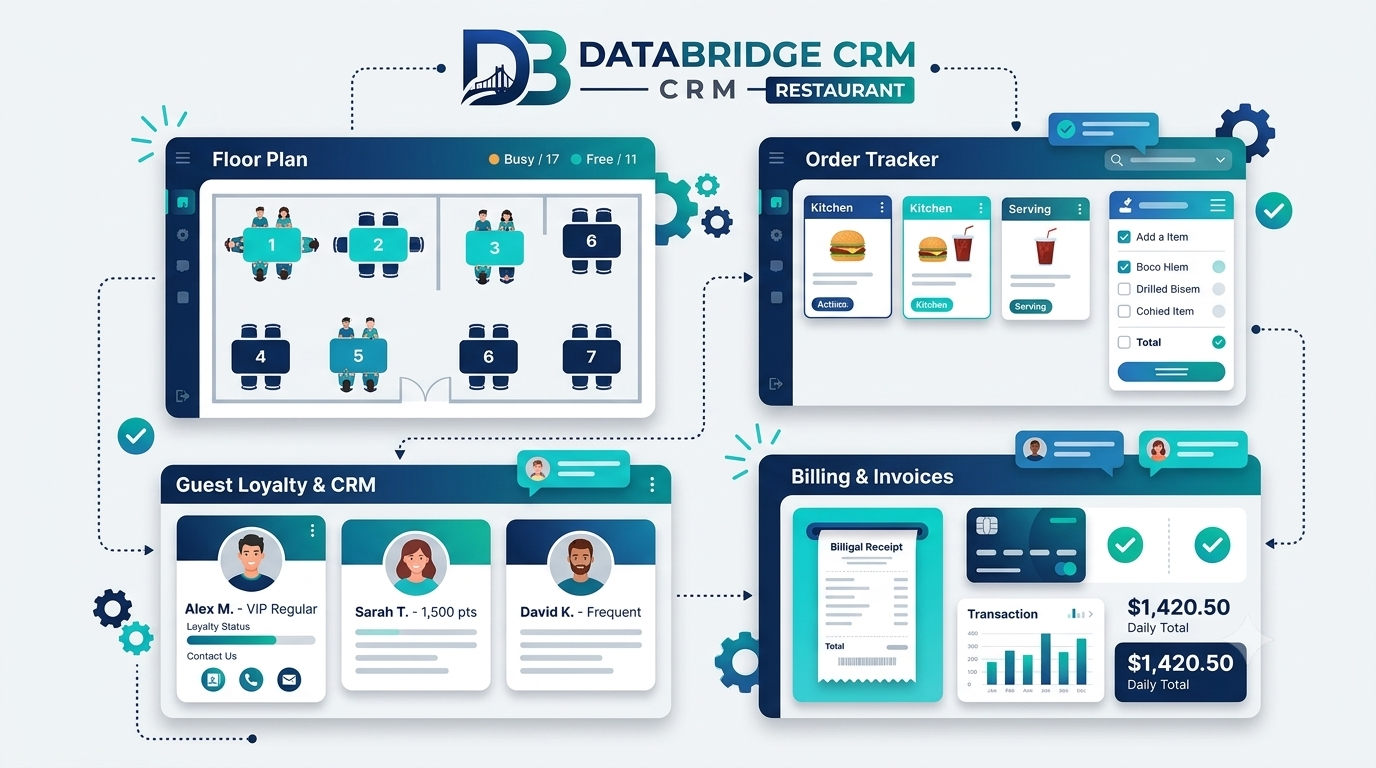
DataBridge lists its Restaurant CRM under the tagline "Tables, orders and kitchen," which describes the flow most restaurants need to digitise. A typical journey looks like this:
- Table opens. The waiter or cashier selects the table and starts an order.
- Order is entered. Items, quantities and special requests such as "less spicy" are added.
- Kitchen is informed. The order reaches the kitchen so cooks work from a clear instruction, not a shouted one.
- Items are added or changed. Guests often order more midway. The running order updates instead of starting a new slip.
- Bill is generated. Taxes, discounts and split payments are handled at the counter.
- Guest record is updated. The visit and the spend are added to the customer's history.
The value is not in any single step. It is in the connection between them, so that nothing is typed twice.
Billing and Payments
Billing is where restaurants lose time and trust. DataBridge's Billing POS product describes GST-compliant thermal and A4 invoices, plus cash, card, UPI and partial payments, with daily cash flow updating automatically. For a restaurant, this matters most at peak hours, when a queue at the counter turns a good meal into a bad memory.
If you run a café or QSR with quick service, fast billing may be your main need. For a sit-down restaurant, split bills and clear table status matter more. When you see a demo, test the exact bill scenario your staff handle most often.
Customer Records and Loyalty
The CRM side begins once you capture a guest's name and phone number at billing. Over time, you build a useful picture of regulars:
- How often they visit
- What they usually order
- How much they spend
- When they last came in
DataBridge's POS describes customer loyalty points and purchase history management. In a restaurant, simple loyalty works well: a free dessert after five visits, or a small discount on a birthday month. Nothing fancy, just a reason to come back.
Always collect contact details with the guest's consent, and use them only for messages they agreed to receive.
Staying in Touch with Guests
Knowing your customers is only half the job. You also need a way to reach them. The DataBridge suite includes WhatsApp marketing and email marketing tools, which restaurants can use for festival menus, new launches or weekday offers sent to customers who opted in. Keep messages short and occasional. A guest who gets a message every day will soon stop reading them.
Working on Android, iOS and Windows
Restaurants use a mix of devices. The counter may run on a Windows PC, a waiter may carry an Android phone or tablet, and the owner may check numbers on an iPhone from home. DataBridge's portal lists apps for all three: an Android app, an iOS app and a Windows PC client, available from the DataBridge portal.
- Android: useful for waiters taking orders at the table and for owners checking sales on the move.
- iOS: suits managers and owners who use iPhones or iPads.
- Windows: suited to the billing counter, where scanners, printers and a steady keyboard matter.
Before you buy, ask which restaurant functions each app supports. Not every feature is always available on every platform, and the demo is the right place to confirm it. The software downloads page lists current options.
How Different Food Businesses Use a Restaurant CRM
Cafés and bakeries
Quick billing, a loyalty card replaced by phone-number lookup, and a record of favourite orders. Cafés live on regulars, so recognising them is half the business.
QSRs and fast food
Speed rules here. Fast order entry, short queues and clear daily sales reports help counters keep up at lunch and dinner peaks.
Cloud kitchens
With no dining room, the kitchen is the business. Order tracking and customer history for repeat ordering matter more than table management. If you take orders from delivery platforms, ask how those orders will be recorded in the system.
Bars, pubs and lounges
Tab handling, split bills and guest records for events. Check local rules on licensing and promotion when you use customer data for marketing.
Sweet shops, ice cream parlours and food courts
Counter billing with many small items, plus festival rush management. Daily item-wise reports show which products to stock before Diwali or summer.
Caterers
Catering depends on enquiries and bookings more than walk-ins. Ask how the system handles event orders, advances and follow-ups.
Benefits by Business Size
- Single outlet: faster billing, fewer order mistakes and a growing list of regular guests.
- Growing restaurants: clearer reports, staff accountability and repeat-customer campaigns.
- Multi-outlet brands: one view of sales across locations, with consistent billing and guest records.
How to Choose a Restaurant CRM
- Does it connect the table, kitchen and bill without retyping?
- Can it handle your tax and invoice requirements?
- Does it run on the devices your staff already use?
- How does it record customers, and can you message them with consent?
- Will it support extra outlets or a cloud kitchen later?
- Is training available, and who do you call when something fails on a Saturday night?
Ask for a demo with your own menu. Seeing your dishes and tables on screen tells you more than a feature list.
Conclusion
A restaurant does not need complicated software. It needs a clear path from order to kitchen to bill, and a way to remember the people who keep coming back. DataBridge Restaurant CRM is built around tables, orders and kitchen, supported by billing, customer records, marketing tools and apps for Android, iOS and Windows.
Frequently Asked Questions
1. What is restaurant CRM software?
It is software that connects tables, orders, kitchen, billing and customer records, so a restaurant can serve guests faster and bring them back.
2. Is it suitable for a small café?
Yes. Even a single café benefits from faster billing, fewer order errors and a record of regular customers.
3. Can the software run on Android, iOS and Windows?
DataBridge's portal lists Android, iOS and Windows PC apps. Confirm which restaurant features each app supports during a demo.
4. Can I send offers to my customers?
The DataBridge suite includes WhatsApp and email marketing tools. Send messages only to customers who have agreed to receive them.
5. Does it work for cloud kitchens?
Order tracking and customer history are useful for cloud kitchens. Ask the team how orders from delivery platforms are handled in your setup.
See It with Your Own Menu
Explore the DataBridge Restaurant CRM, then book a free demo or contact the team to discuss your outlet.
#DataBridgeCRM #RestaurantCRM #RestaurantSoftware #CafeBilling #FoodBusinessIndia
Restaurant CRM Software, Restaurant POS, Restaurant Billing Software, Table Management, Order Management, Cafe Software, Cloud Kitchen Software, Restaurant Customer Management, Food Business Software, DataBridge CRM

