Every small business owner knows the feeling. A customer buys on credit, promises to pay next week, and then the payment is forgotten. Meanwhile, new customers send messages at night, and nobody replies on time. Good reviews never come because nobody asks for them.
These are the everyday problems of shops, traders, service providers and local brands. The good news is that modern udhaar management software can solve all of them from one place.
In this guide, you will learn how DataBridge CRM VyaparDiary combines a digital khata for small business, a customer ledger, WhatsApp automation and a Google Review Booster into one simple system. You can explore the full platform at DataBridge CRM.
What Is Udhaar Management Software?
Udhaar management software is a digital tool that records, tracks and recovers credit given to customers. Instead of writing dues in a paper notebook, you store every entry safely online.
A good udhaar management system helps you to:
• Record credit sales and payments received
• See who owes you money at any moment
• Send timely payment reminders
• Reduce arguments and forgotten dues
• Keep your business records clean and professional
Paper registers get lost, torn or misread. A digital system never loses a record, and you can open it from your phone or computer at any time.
Why Every Business Needs Customer Ledger Software
Customer ledger software keeps a separate account for every customer. Each account shows what was sold, what was paid and what is still pending.
This gives you three big advantages:
Clarity. You know exactly how much money is stuck in the market.
Trust. When a customer asks about their balance, you can show the exact figure in seconds.
Control. You can decide who deserves more credit and who needs a reminder.
When your customer ledger is connected with your CRM, you go one step further. You do not only record dues, you also communicate with customers, follow up on leads and build long-term relationships.
Digital Khata for Small Business: From Notebook to Smart System
The traditional khata book has served Indian traders for generations. But today, customers expect fast replies, clear bills and polite reminders on WhatsApp.
A digital khata for small business brings the same simplicity of the old khata with the power of modern technology. With VyaparDiary inside DataBridge CRM, you can manage customers, invoices, quotations, leads and reminders from one dashboard.
The platform also includes tools such as Website Builder, CRM and ERP, Quotation, Invoices, Calculator, Leads and Contact Diary. This means your entire business workflow stays under one roof.
Meet DataBridge CRM VyaparDiary
DataBridge CRM VyaparDiary is built for small and growing businesses that want to digitise their daily work without complicated setup. It connects your ledger, your customers and your WhatsApp communication in one place.
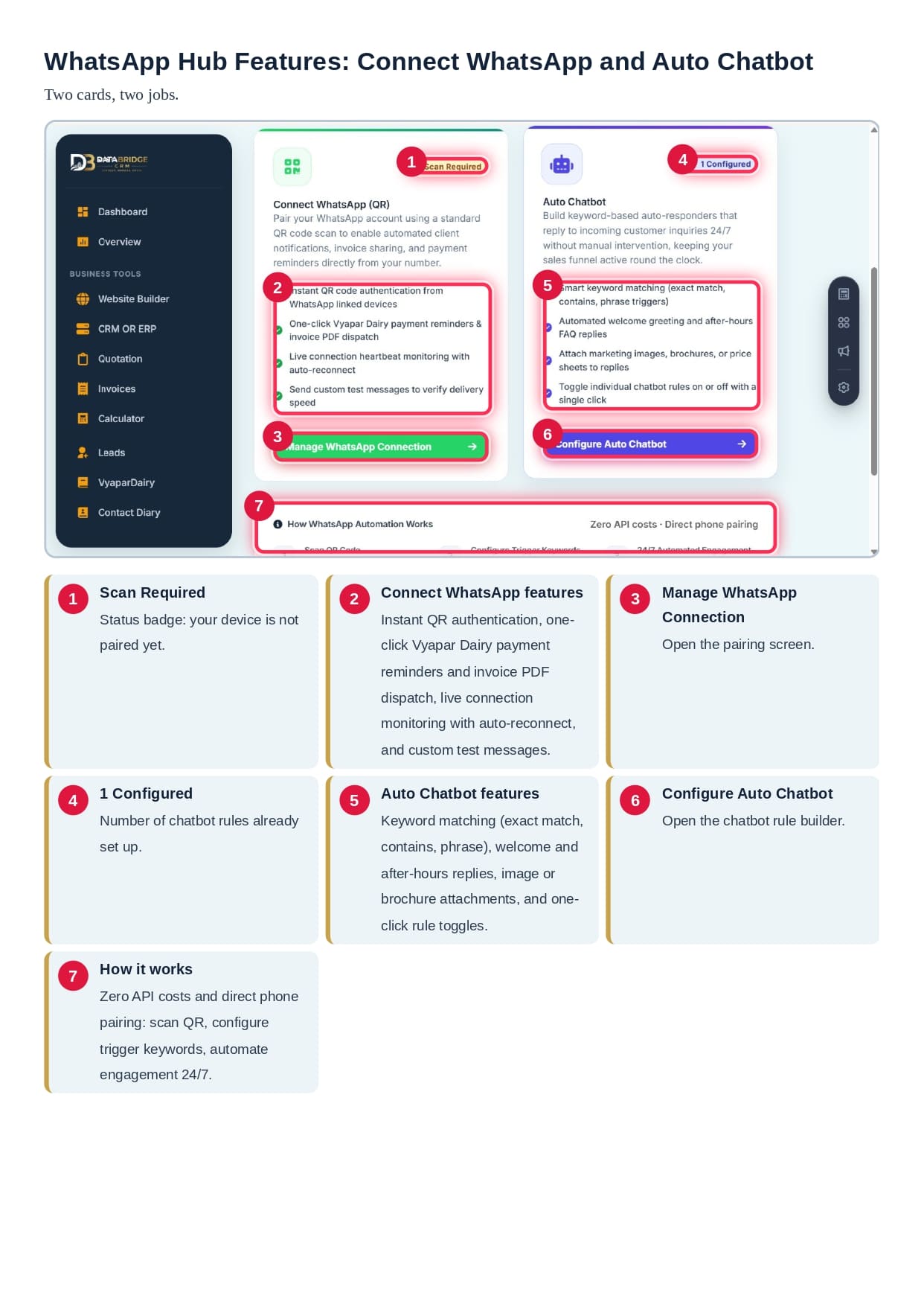
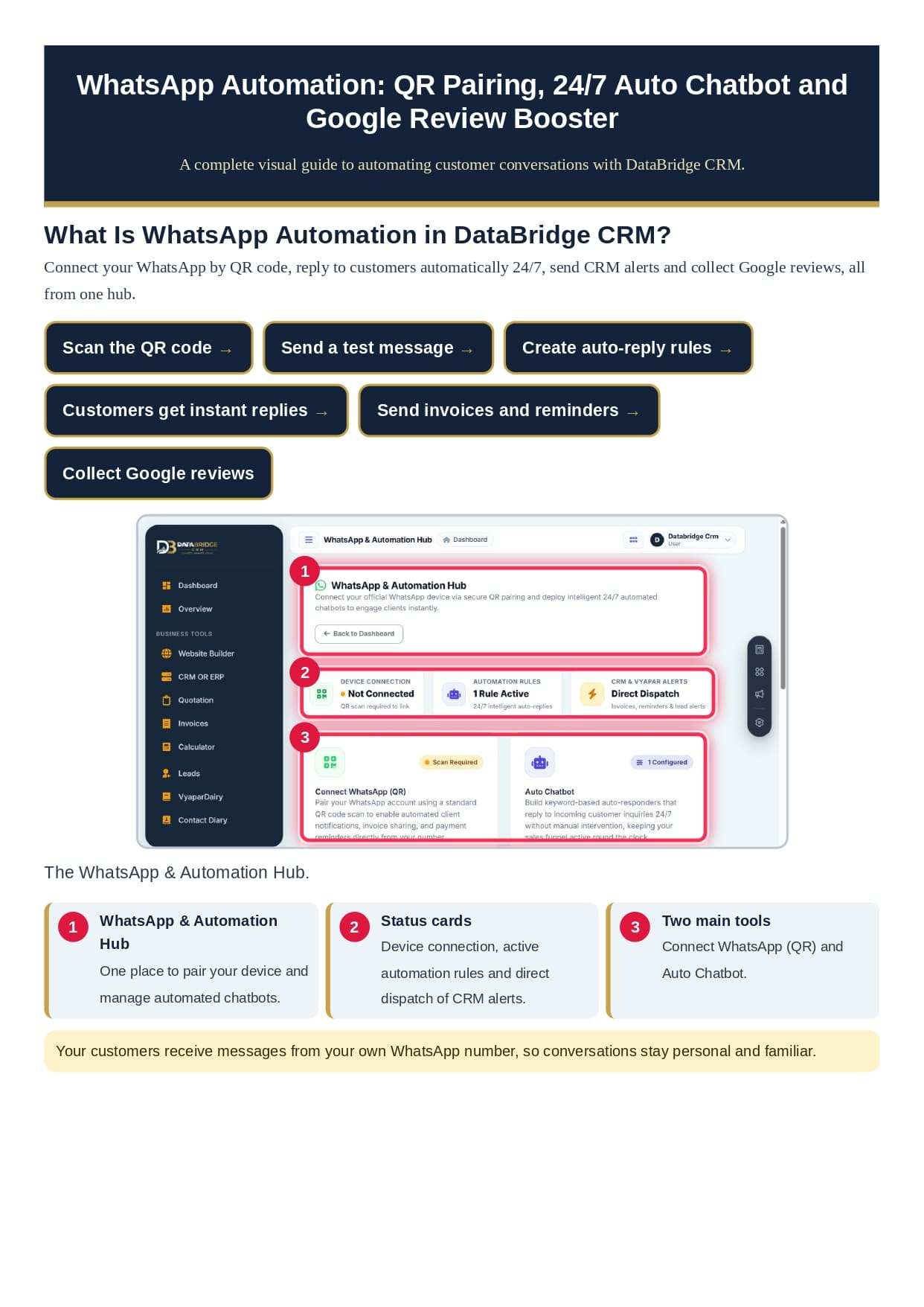
Its WhatsApp and Automation Hub gives you two main tools:
• Connect WhatsApp (QR): Pair your own WhatsApp number using a standard QR scan.
• Auto Chatbot: Build keyword-based replies that answer customers 24/7.
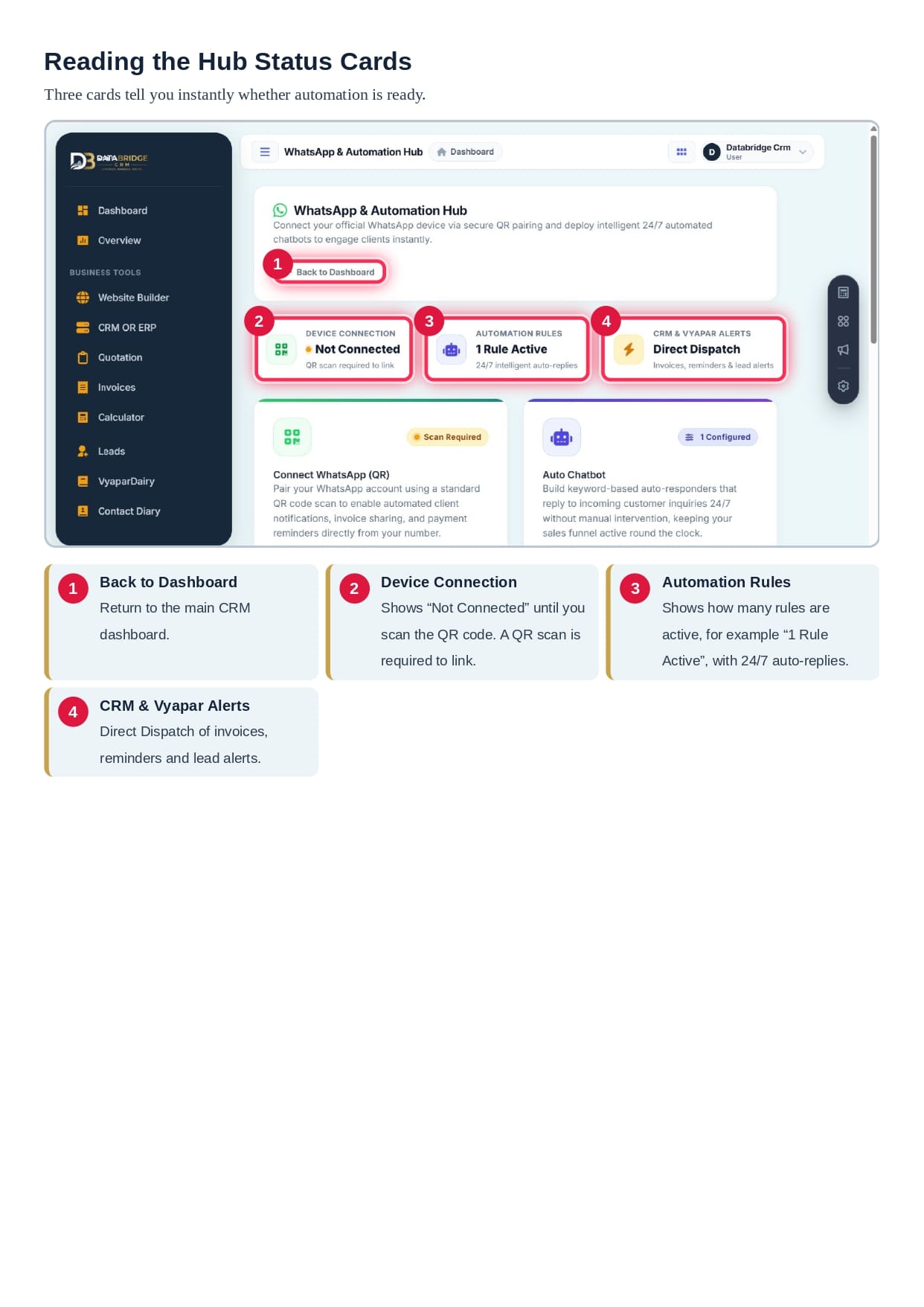
The hub also shows three simple status cards: device connection, automation rules and direct dispatch of CRM alerts. At a glance, you know whether your automation is ready.
Because messages go out from your own WhatsApp number, conversations stay personal and familiar. Customers see a number they already know and trust.
Connect Your WhatsApp with a Simple QR Scan
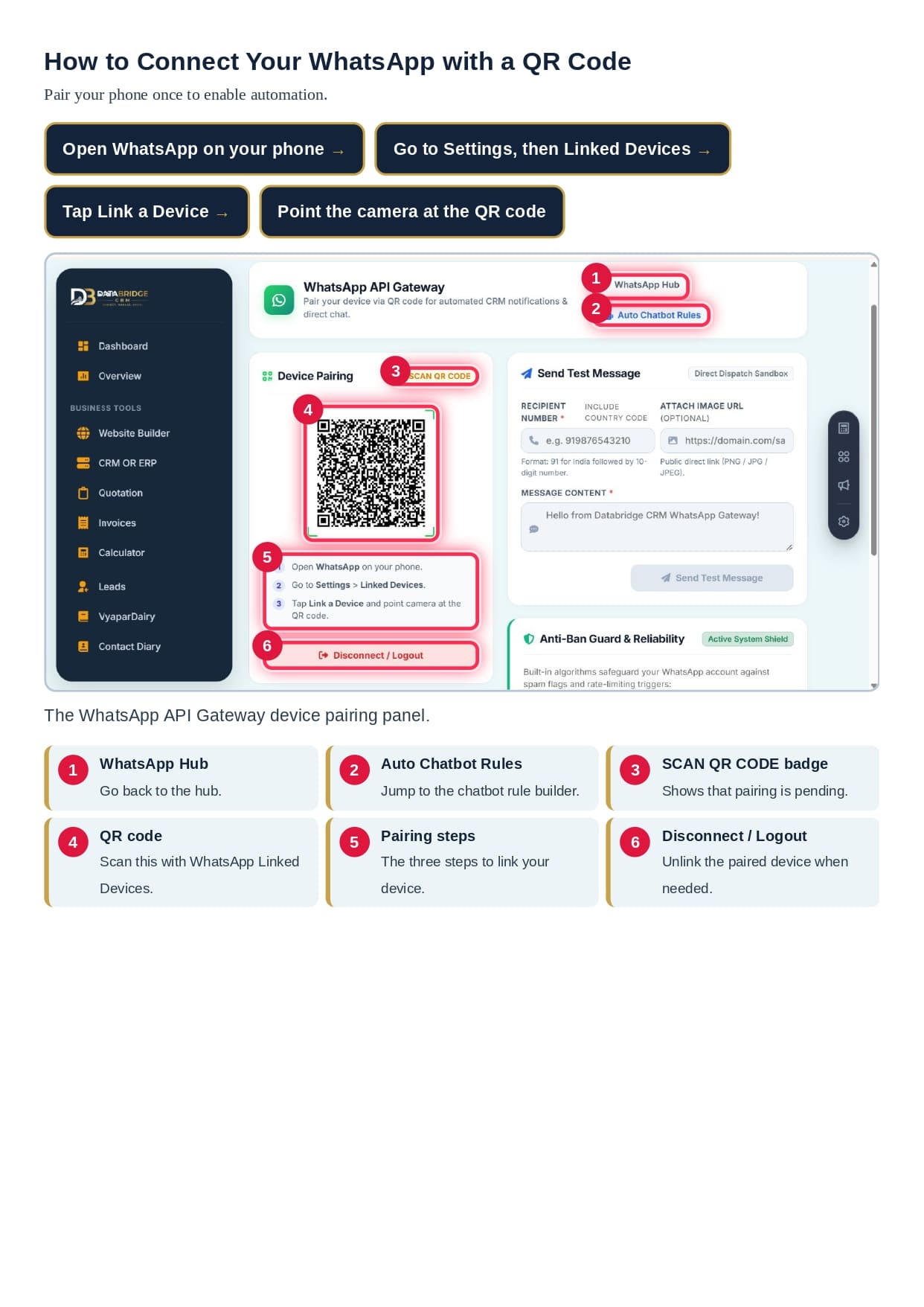
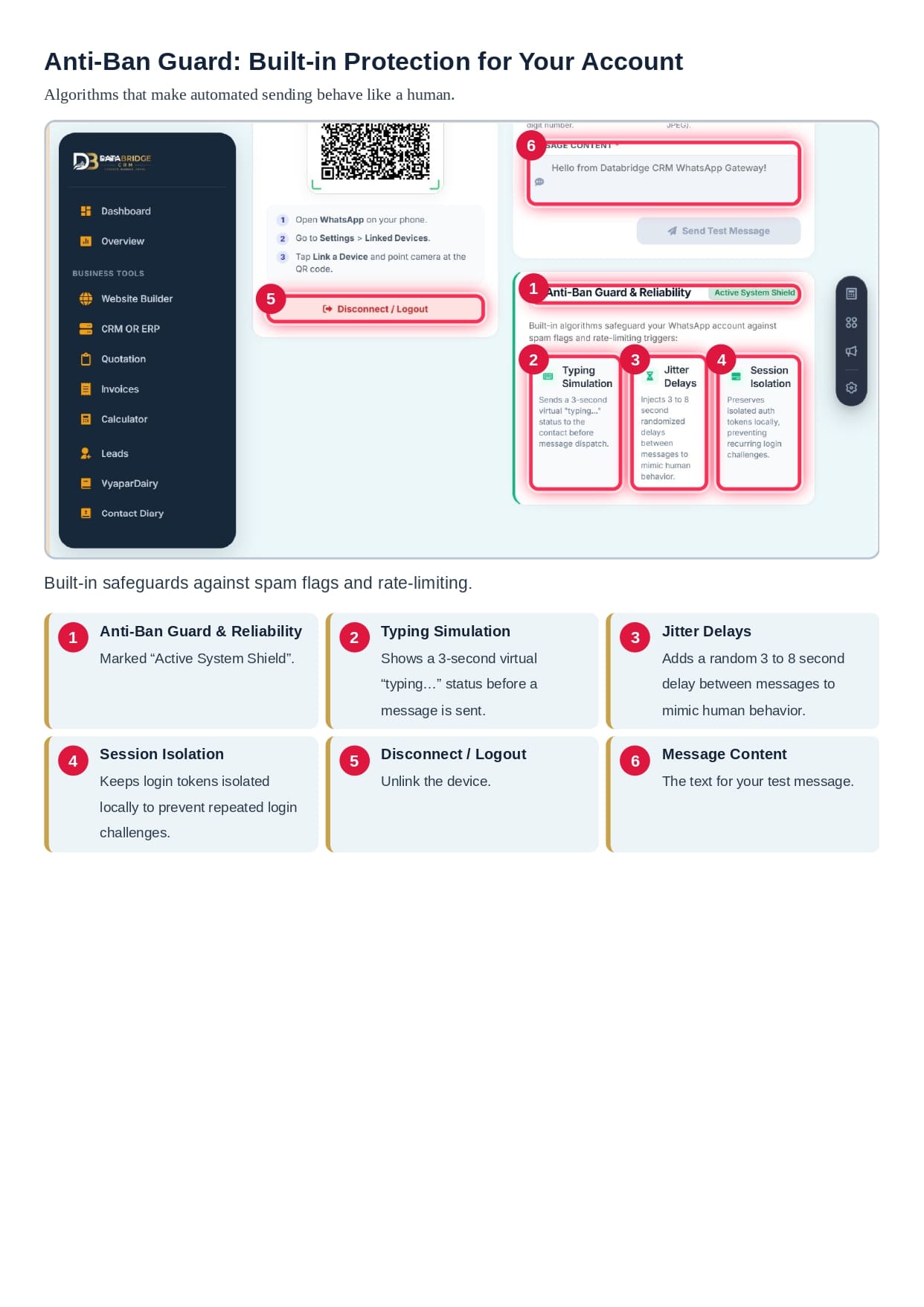
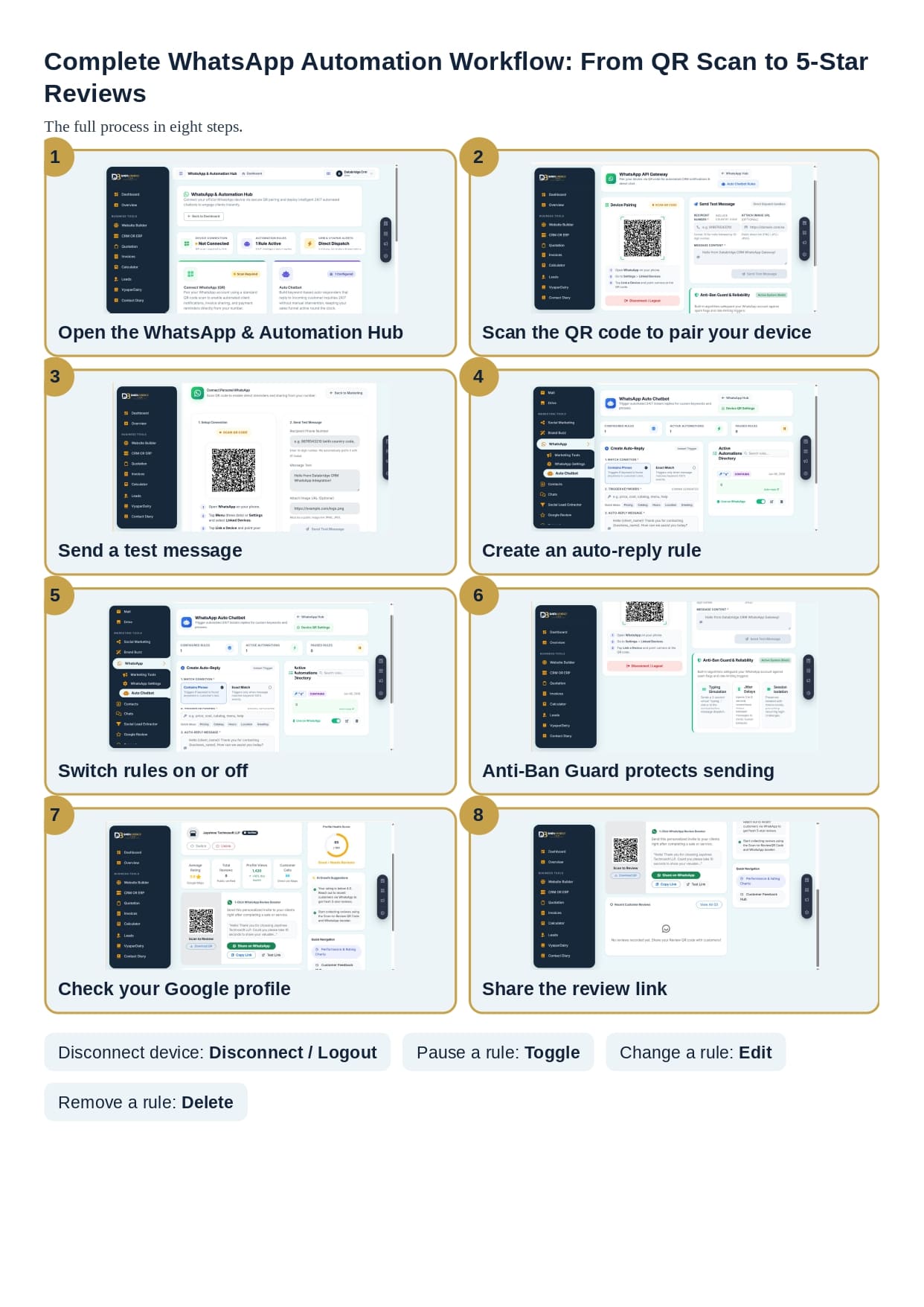
Pairing your WhatsApp takes only a few moments. You open WhatsApp on your phone, go to Settings, choose Linked Devices, tap Link a Device and point your camera at the QR code shown in the CRM.
Once paired, your CRM can send invoices, payment reminders and lead alerts directly from your number. The platform works through direct phone pairing, so you do not need to pay for complicated API setups.
The connection panel also has a live status badge, so you always know if your device is linked. If you ever need to unlink, a Disconnect or Logout button is available.
Send a Test Message Before Going Live
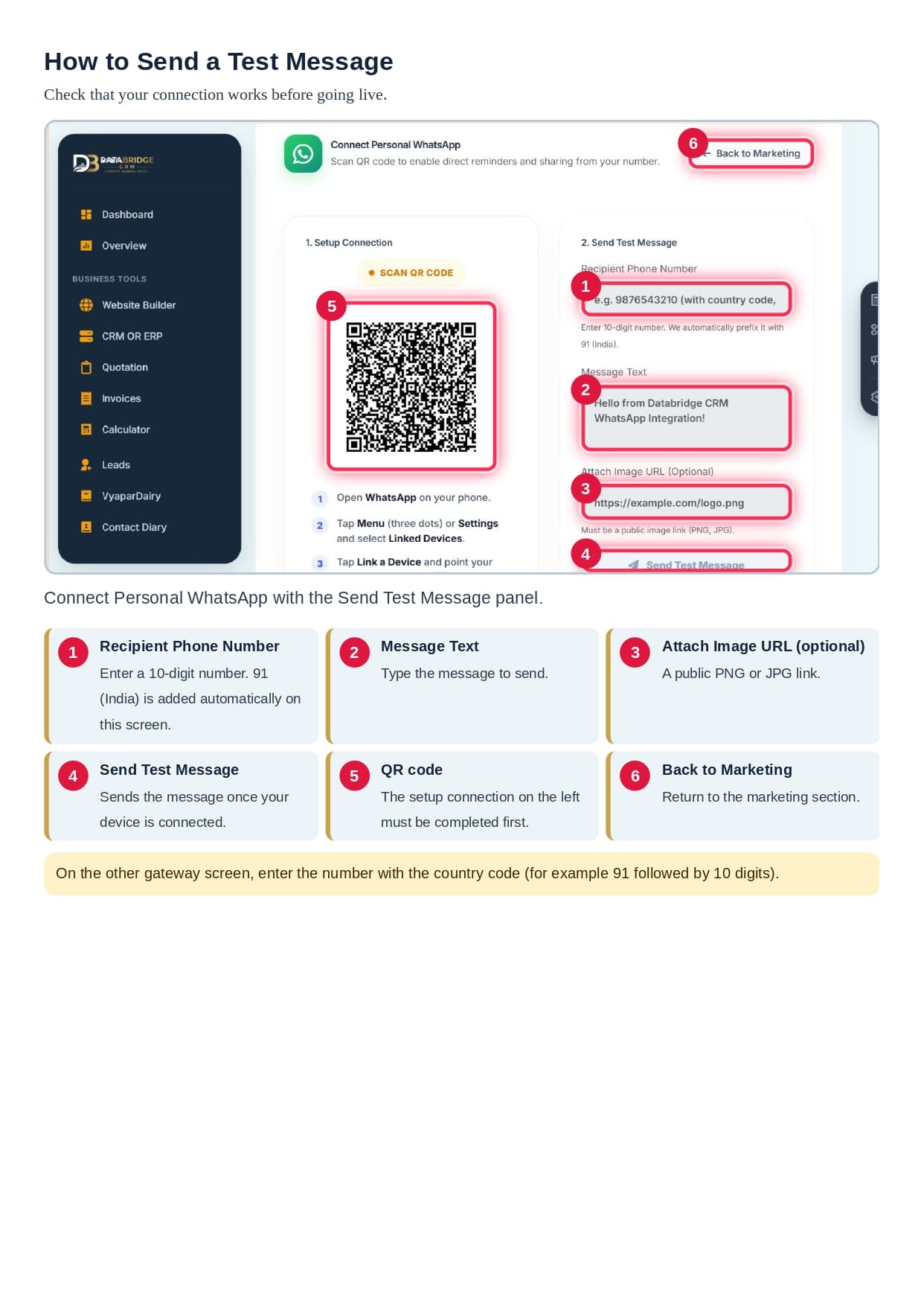
Smart businesses always test before they launch. VyaparDiary includes a Send Test Message panel where you can check that everything works.
You enter the recipient’s 10-digit mobile number, and the system automatically adds the India country code. Then you type your message and, if you like, attach a public image link in PNG or JPG format.
Within seconds, you can confirm that your WhatsApp connection is fast and reliable. It is a simple habit that avoids mistakes with real customers.
Auto Chatbot: Reply to Customers 24/7
Customers rarely wait. If you reply late, they may move to a competitor. The Auto Chatbot inside DataBridge CRM answers common questions instantly, even when you are asleep or busy.
You can set up rules for questions about:
• Pricing and rates
• Product catalog
• Shop timings
• Location and directions
• Greetings and welcome messages
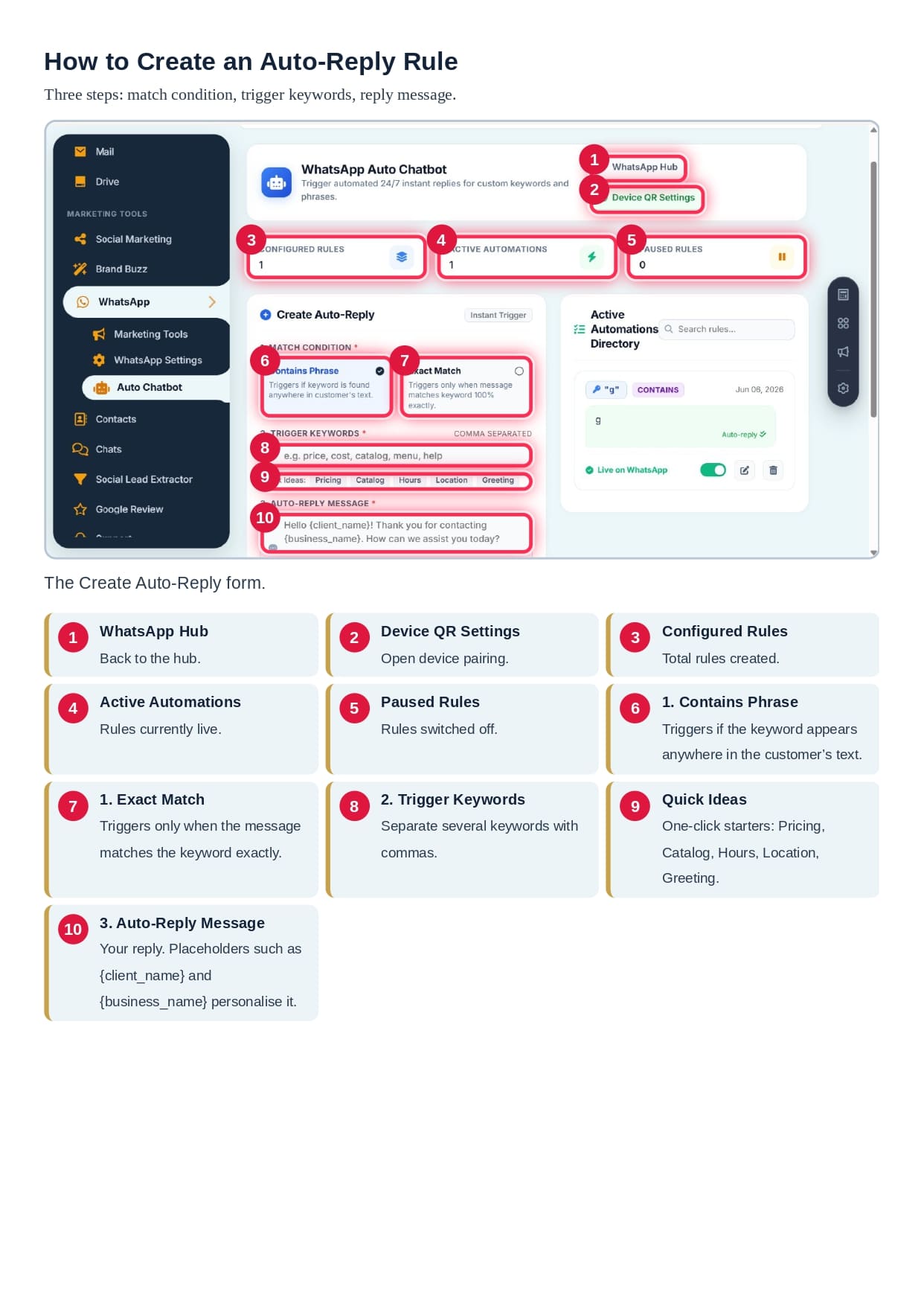
Your replies can be personalised using placeholders such as the customer’s name and your business name. For example, a greeting can say hello to the client by name and thank them for contacting your business.
You can also attach images, brochures or price sheets to your automatic replies. This makes your chatbot feel like a real assistant, not a robot.
Exact Match vs Contains: Choose the Right Rule
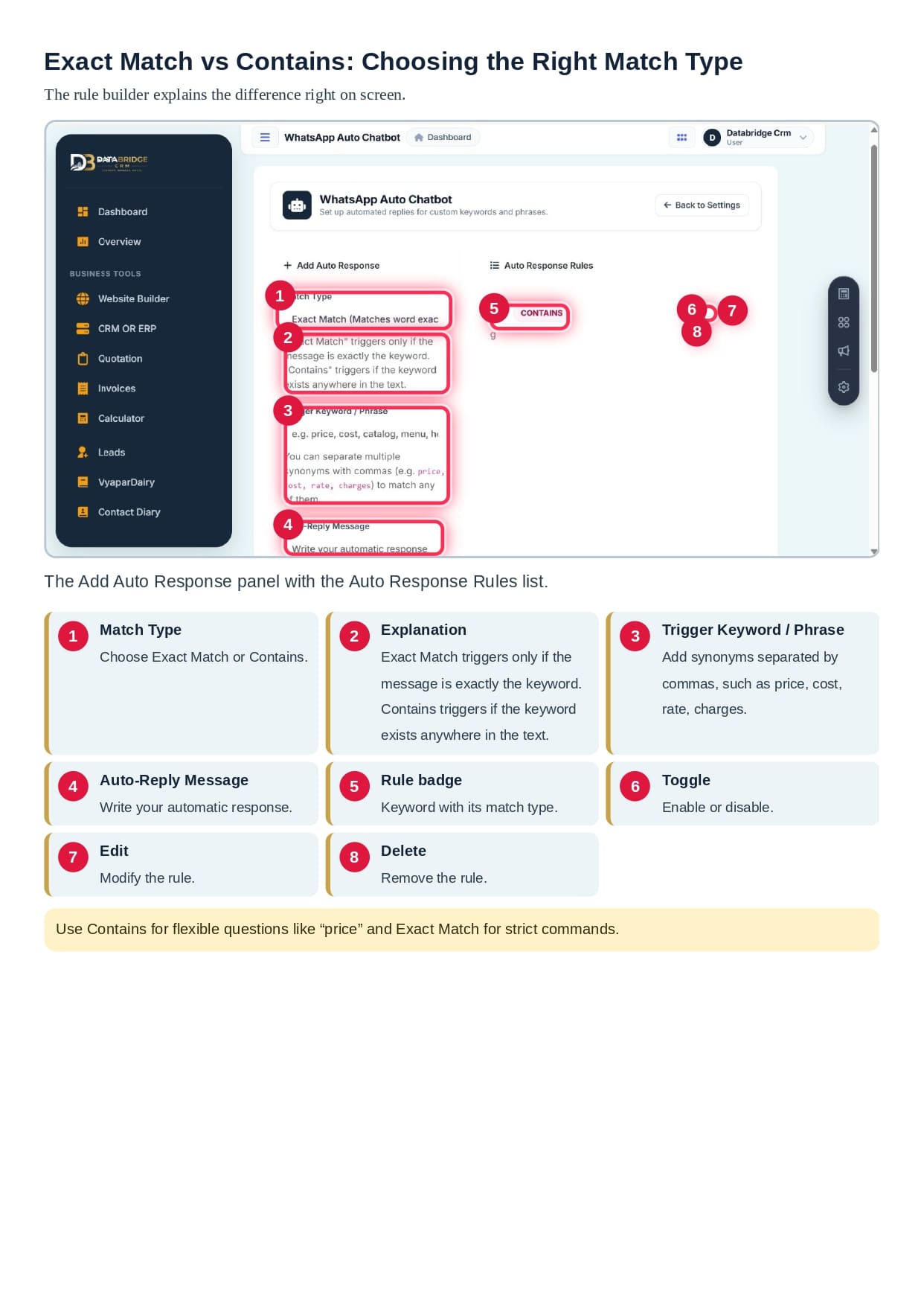
When you create an auto reply, you pick one of two match conditions.
Contains Phrase triggers the reply if your keyword appears anywhere in the customer’s message. This is perfect for flexible questions. If a customer writes “What is the price of this item?”, a rule built on the word price will respond.
Exact Match triggers only when the message matches your keyword exactly. This works well for strict commands, such as a single word that starts a menu.
You can add several keywords in one rule by separating them with commas, for example price, cost, rate and charges. This way, one rule covers many different ways of asking the same question.
Manage Your Automations Easily
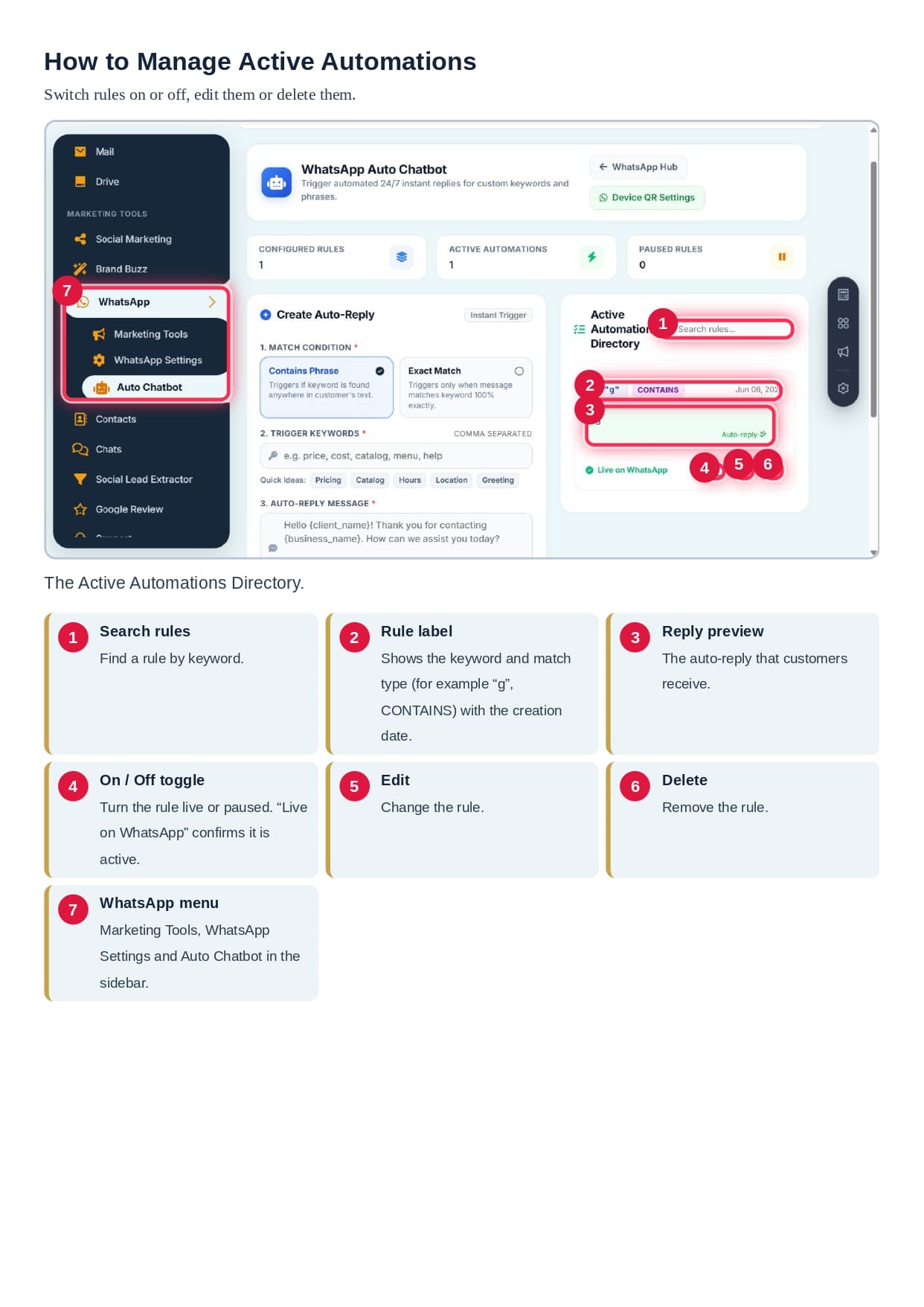
Once your rules are live, you can control them from the Active Automations Directory. Here you can search for a rule by keyword, see the reply preview, switch the rule on or off, edit it or delete it.
Three summary cards show your configured rules, active automations and paused rules. So if you want to pause a seasonal offer, you simply turn it off with one click and switch it back on later.
Anti-Ban Guard: Protecting Your WhatsApp Account
Many business owners worry about WhatsApp restrictions. VyaparDiary answers this concern with its built-in Anti-Ban Guard and Reliability system, marked as an Active System Shield.
It protects your account with three safeguards:
Typing simulation. The system shows a short virtual typing status before a message is sent, just like a real person.
Jitter delays. A random delay of three to eight seconds is added between messages, so your sending pattern looks natural.
Session isolation. Login tokens are kept isolated locally, which helps prevent repeated login challenges.
Together, these features help your automated messaging behave in a more human way, which is a smart practice for any business using WhatsApp.
Payment Reminders and Invoices Through WhatsApp
For any udhaar management software, reminders are the most valuable feature. A polite message at the right time often brings the payment without any awkward phone call.
With DataBridge CRM VyaparDiary, you can send invoice PDFs and payment reminders directly from your own WhatsApp number. The Direct Dispatch card in the hub handles invoices, reminders and lead alerts together.
This helps you to:
• Recover pending udhaar faster
• Reduce the need for repeated phone calls
• Keep a professional tone with every customer
• Save hours of manual work every week
Google Review Booster: Turn Happy Customers into 5-Star Reviews
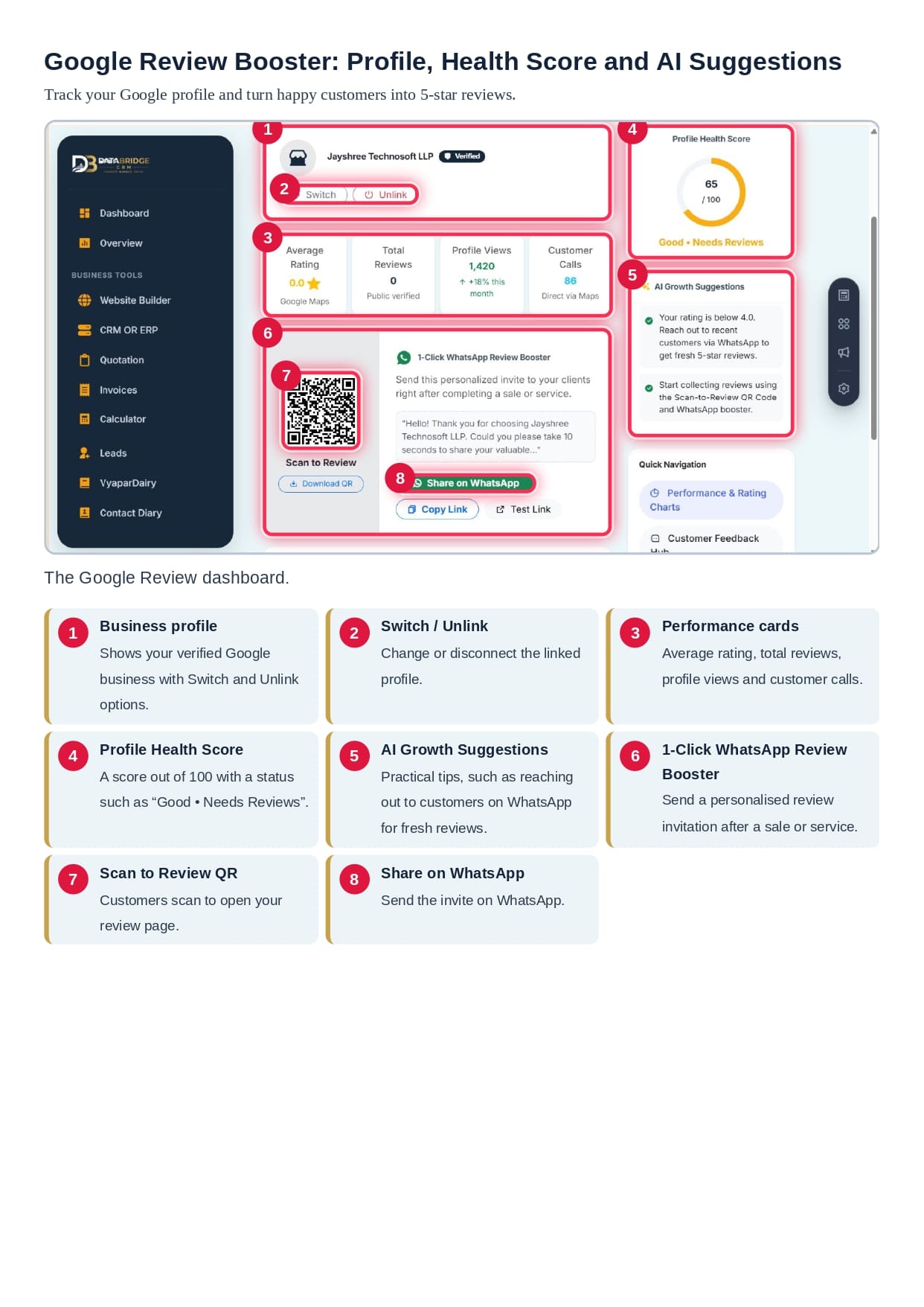
Good reviews bring new customers. Most people check Google Maps before visiting a shop or hiring a service. The Google Review Booster in DataBridge CRM helps you collect more reviews with almost no effort.
The dashboard shows your verified business profile along with:
• Average rating
• Total reviews
• Profile views
• Customer calls
It also gives you a Profile Health Score out of 100, with simple AI growth suggestions. For example, if your rating is low, the system advises you to reach out to recent customers on WhatsApp and request fresh reviews.
Collect Reviews with QR Code and WhatsApp
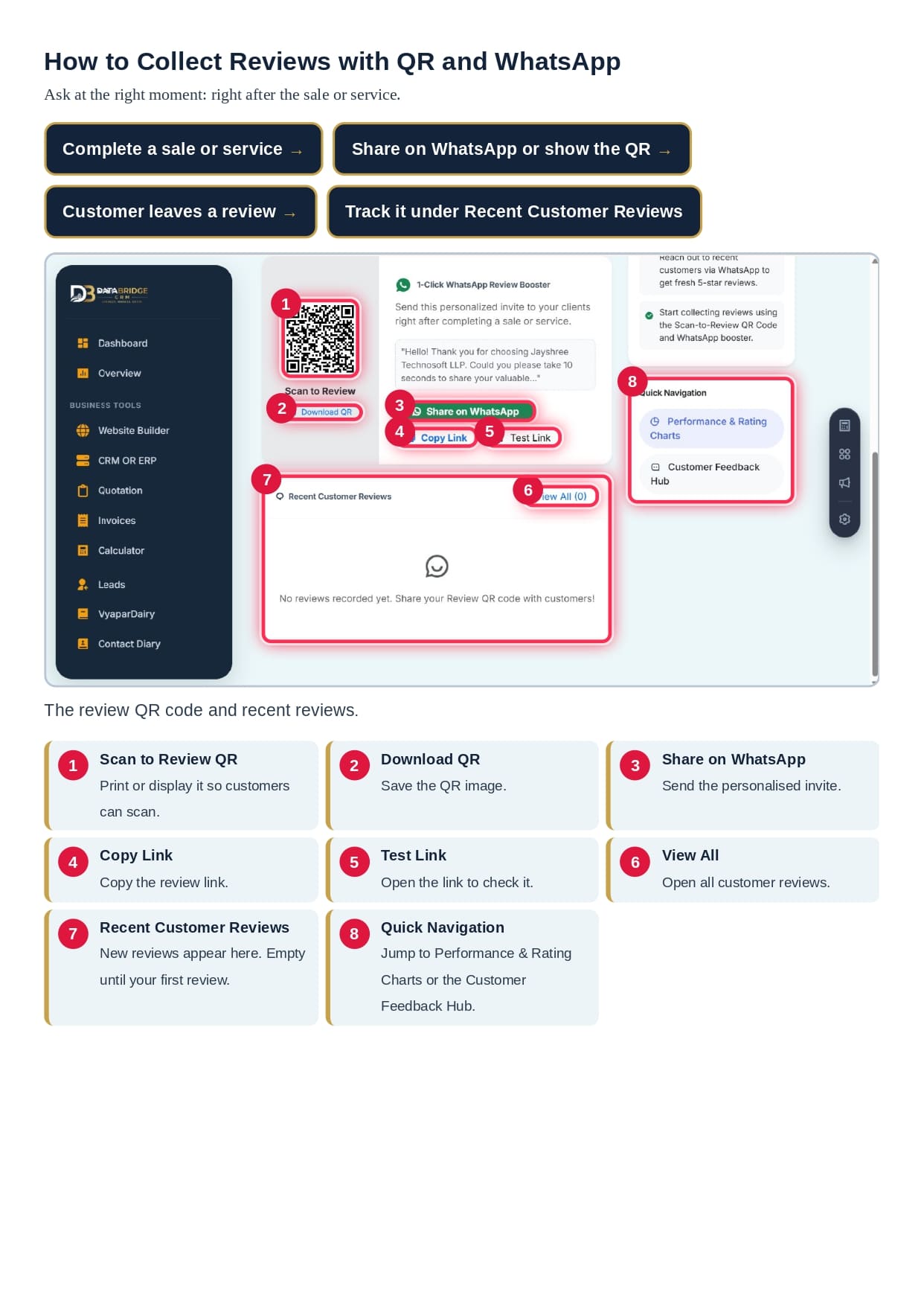
Timing is everything when you ask for a review. The best moment is right after a successful sale or service, when the customer is happiest.
The 1-Click WhatsApp Review Booster lets you send a personalised invitation instantly. You can also download your Scan to Review QR code and place it at your counter, on your bill or in your shop. Customers scan it and land directly on your review page.
You can also copy the review link, test it, and track new feedback in the Recent Customer Reviews section. Over time, this builds trust and improves your local search ranking.
Benefits of Using Udhaar Management Software with CRM
When your ledger, WhatsApp and reviews work together, your business becomes more organised and more profitable.
• Better cash flow through timely reminders
• Faster replies through the 24/7 chatbot
• Stronger reputation through more Google reviews
• Less manual work through automation
• Better customer relationships through personal WhatsApp communication
• One dashboard for invoices, leads, quotations and ledger
Who Can Use DataBridge CRM VyaparDiary?
This platform is useful for many types of businesses:
• Retail shops and kirana stores
• Wholesalers and distributors
• Service providers and freelancers
• Clinics, salons and coaching centres
• Local brands and growing start-ups
If you give credit, send invoices or depend on customer reviews, you can benefit from it.
Frequently Asked Questions
What is udhaar management software?
It is a digital system that records credit given to customers, tracks pending payments and helps you send reminders so you recover money faster.
What is customer ledger software?
It maintains a separate account for each customer, showing sales, payments and the outstanding balance in one clear view.
Is a digital khata good for small business?
Yes. A digital khata for small business is safer, faster and more accurate than a paper register, and it can be accessed from anywhere.
What is VyaparDiary?
VyaparDiary is the ledger and business diary tool inside DataBridge CRM, designed to manage customers, dues, invoices and reminders.
Can I use my own WhatsApp number?
Yes. You pair your phone by scanning a QR code, and messages are sent from your own number.
Does the chatbot work all day?
Yes. Your auto reply rules respond to customer keywords 24/7 without manual effort.
Can it help me get more Google reviews?
Yes. The Google Review Booster provides a review QR code, a shareable link and a one-click WhatsApp invitation.
Final Thoughts
Running a small business is hard enough without chasing payments and missing customer messages. With the right udhaar management software, you can control your credit, protect your time and grow your reputation.
DataBridge CRM VyaparDiary brings a customer ledger, a digital khata, WhatsApp automation and a Google Review Booster into one easy platform. Start simple, test your connection, set up a few smart rules and let automation do the repetitive work for you.
Ready to modernise your business? Visit DataBridge CRM today and discover how VyaparDiary can help you manage udhaar, delight customers and earn more 5-star reviews.
________________________________________
#UdhaarManagementSoftware #CustomerLedgerSoftware #DigitalKhata #DigitalKhataForSmallBusiness #VyaparDiary #DataBridgeCRM #DataBridgeCRMVyaparDiary #KhataBook #UdhaarKhata #SmallBusinessIndia #SmallBusinessSoftware #WhatsAppAutomation #WhatsAppChatbot #AutoReply #GoogleReviews #GoogleReviewBooster #LocalSEO #CRMSoftware #BusinessAutomation #InvoiceSoftware #PaymentReminder #DigitalIndia #MSME #Vyapar #LedgerApp #BusinessGrowth #CustomerManagement