
In today’s fast-paced digital economy, efficient financial management is the backbone of any scaling business. Manual billing processes, fragmented tax tracking, and delayed payment notifications often lead to cash flow bottlenecks and operational errors. Whether you are operating a local enterprise in Jaipur, Delhi, or expanding globally, automating your corporate invoicing workflow is essential for maintaining accuracy and professional client communication.
DataBridge CRM Invoicing Software provides an end-to-end cloud solution designed to streamline client billing, automate tax computations (including GST), and deliver instant invoices via integrated WhatsApp sharing. This complete operational guide walks you through every feature of the DataBridge CRM Invoice Builder, helping your accounts team generate, track, and send corporate invoices effortlessly.
What Is DataBridge CRM Invoice Builder?
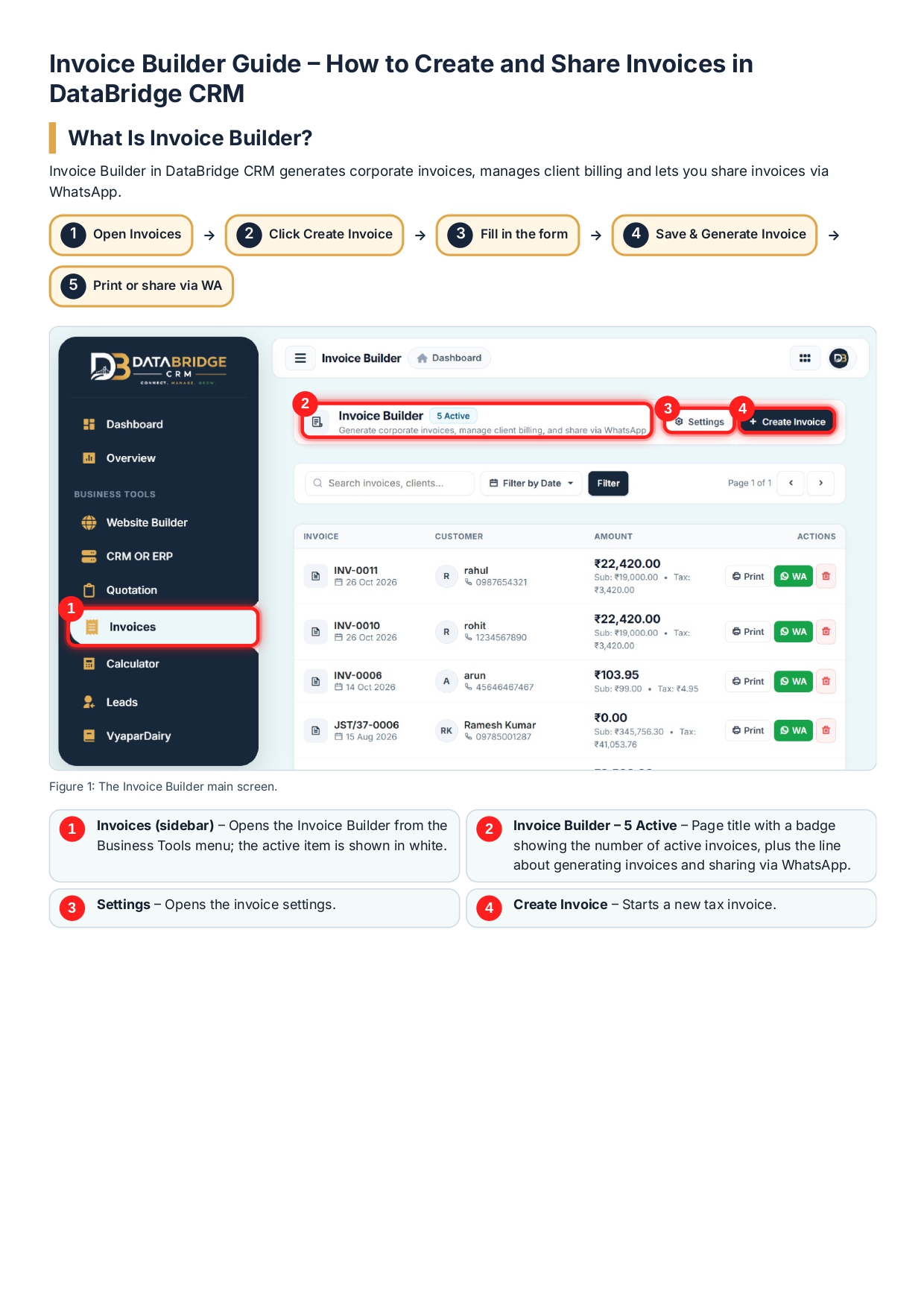
The DataBridge CRM Invoice Builder is a centralized billing workspace built inside the DataBridge CRM ecosystem. It allows businesses to issue sequential tax invoices, manage customer directory details, add dynamic product itemizations with tax percentages, and instantly execute action-level commands such as printing or sending invoices via WhatsApp directly to client phone numbers.
Key Benefits of Automated Billing with DataBridge CRM:
- Automated Sequential Numbering: Prevents duplicate billing by automatically generating sequential invoice numbers (e.g.,
INV-0012). - Real-time Tax Calculations: Automatically computes Subtotals, GST percentages, Flat Discounts, and Final Grand Totals.
- Integrated Client Directory: Stores client contact credentials, email addresses, phone numbers, and billing locations for recurring use.
- One-Click Multi-Channel Distribution: Enables instant PDF printing and direct WhatsApp messaging with customized invoice details.
Step-by-Step Invoice Generation Process
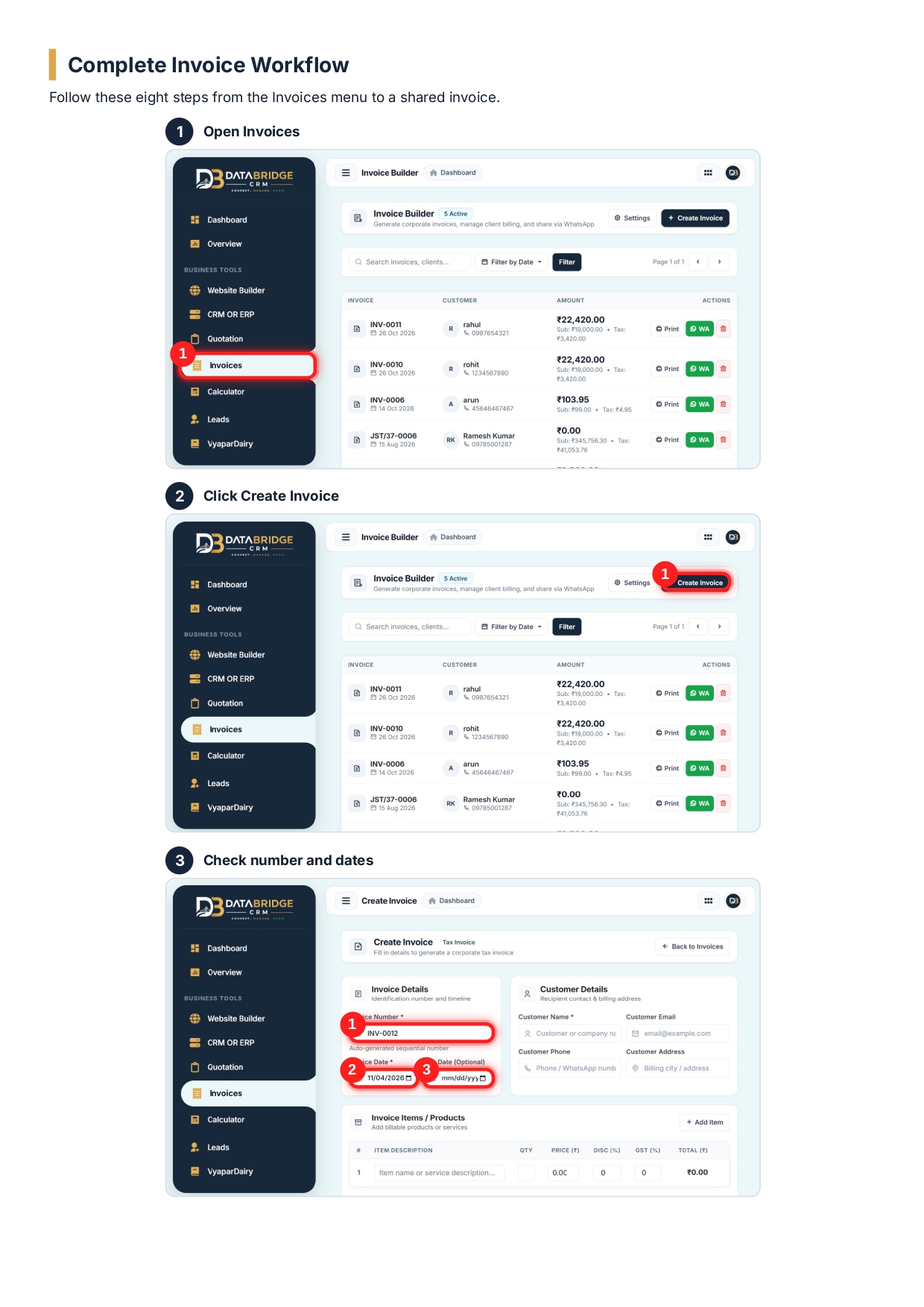
Generating a professional corporate invoice in DataBridge CRM involves a smooth, unified workflow. Follow this detailed process to create and dispatch invoices without operational delay.
[ Open Invoices Workspace ] ──> [ Click Create Invoice ] ──> [ Fill Customer & Invoice Details ] ──> [ Add Line Items & Discounts ] ──> [ Review Totals & Save ] ──> [ Print or WhatsApp Share ]
Phase 1: Navigating to the Invoice Builder Workspace
- Log in to your DataBridge CRM Dashboard.
- From the main left navigation drawer under Business Tools, click on Invoices.
- On the top action bar of the Invoice Builder Workspace, click the blue
+ Create Invoicebutton to launch the tax invoice form.
Phase 2: Invoice Identification and Customer Details Entry
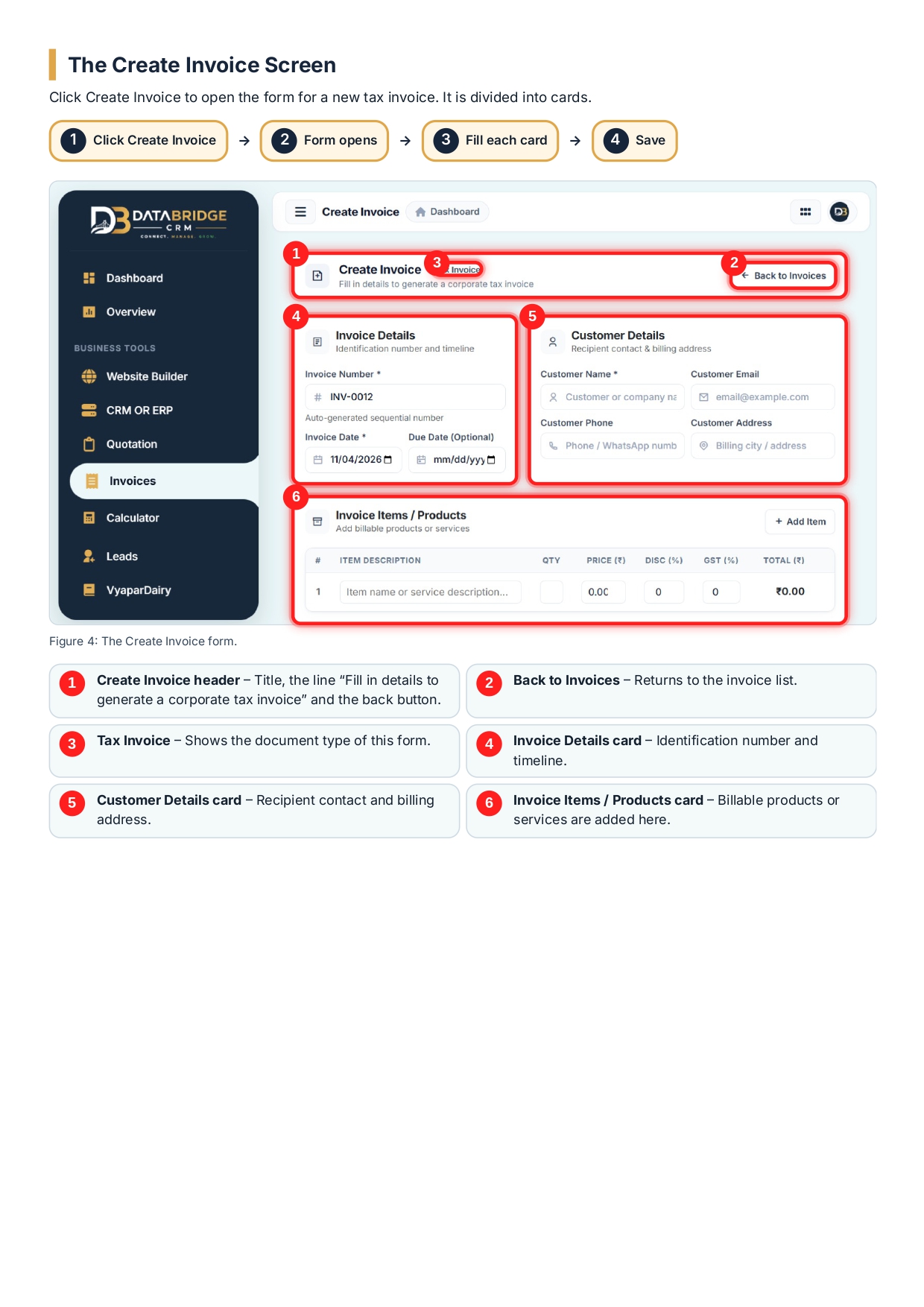
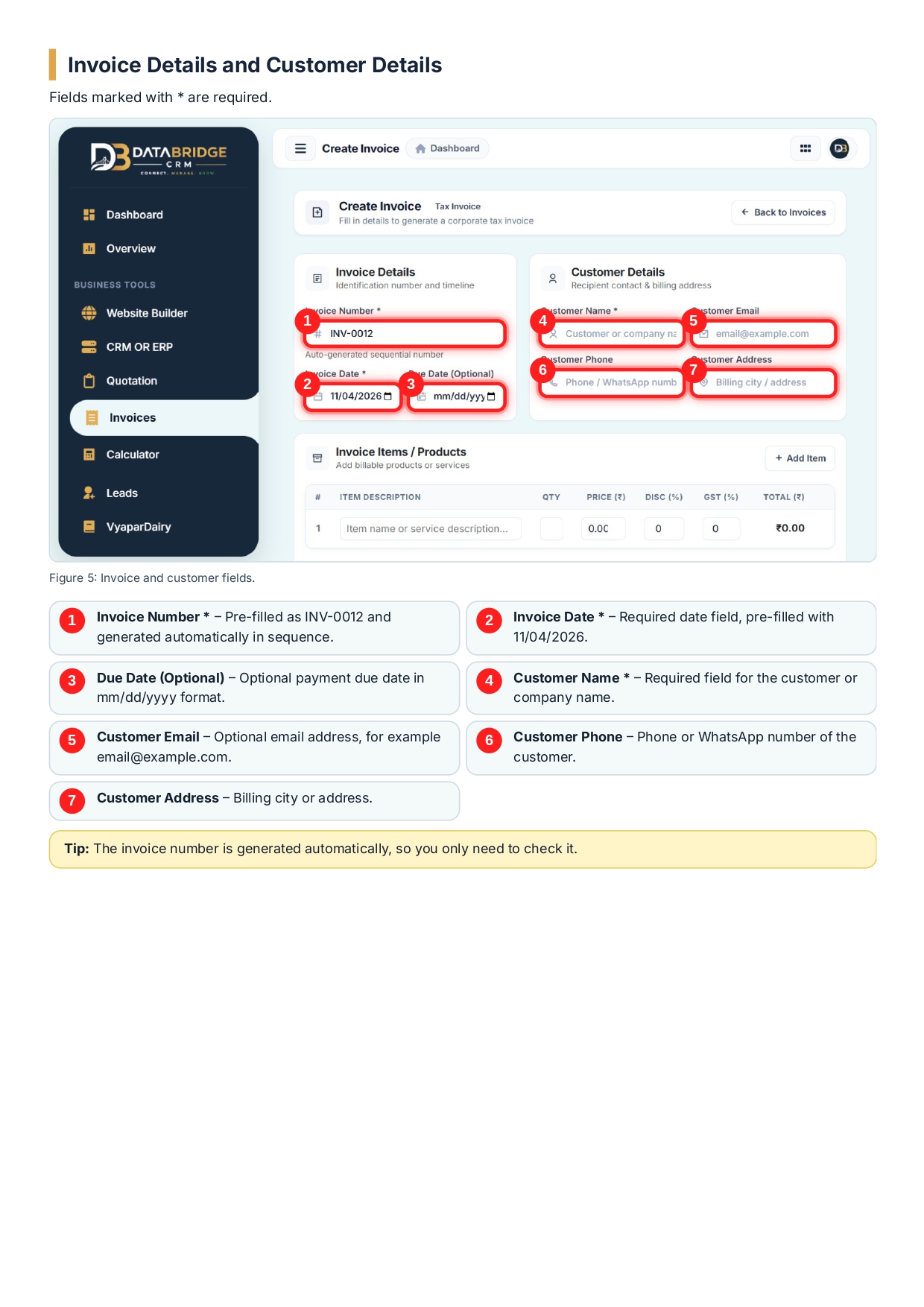
Once the invoice creation screen opens, complete the primary credential fields:
- Invoice Number (
*): Pre-filled automatically in sequential order (e.g.,INV-0012). This ensures standard audit compliance. - Invoice Date (
*): Pre-filled with the current system date (e.g.,11/04/2026). You can modify this date if backdating is required. - Due Date (Optional): Specify the payment deadline using the
mm/dd/yyyyselector to track receivables. - Customer Name (
*): Input the full legal entity or personal name of the client. - Customer Email: Enter the recipient’s business email address (e.g.,
[email protected]) for digital record keeping. - Customer Phone: Enter the mobile or WhatsApp phone number of the client for direct messaging.
- Customer Address: Record the billing location, street details, or city.
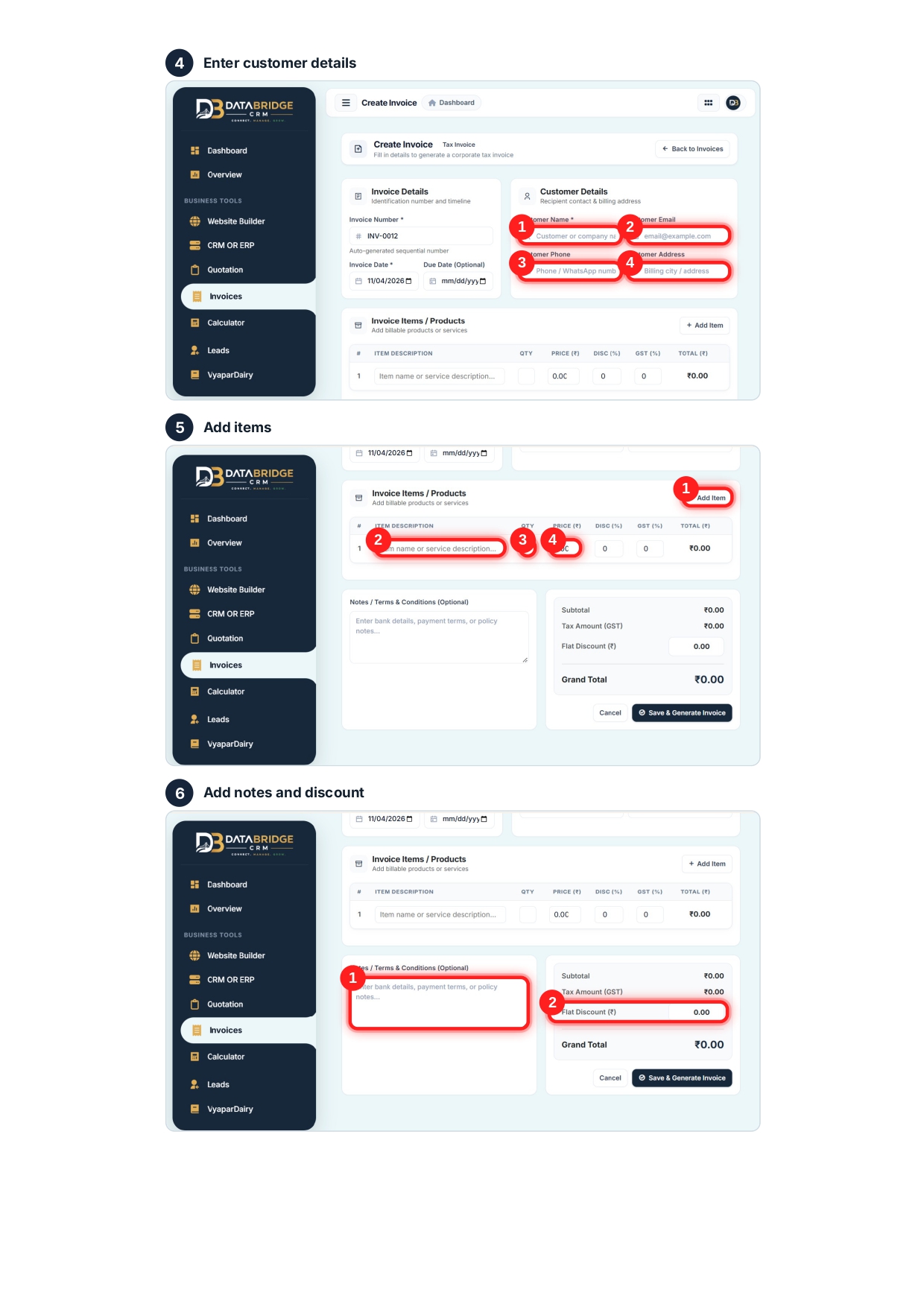
Phase 3: Adding Products, Services, and Tax Breakdown
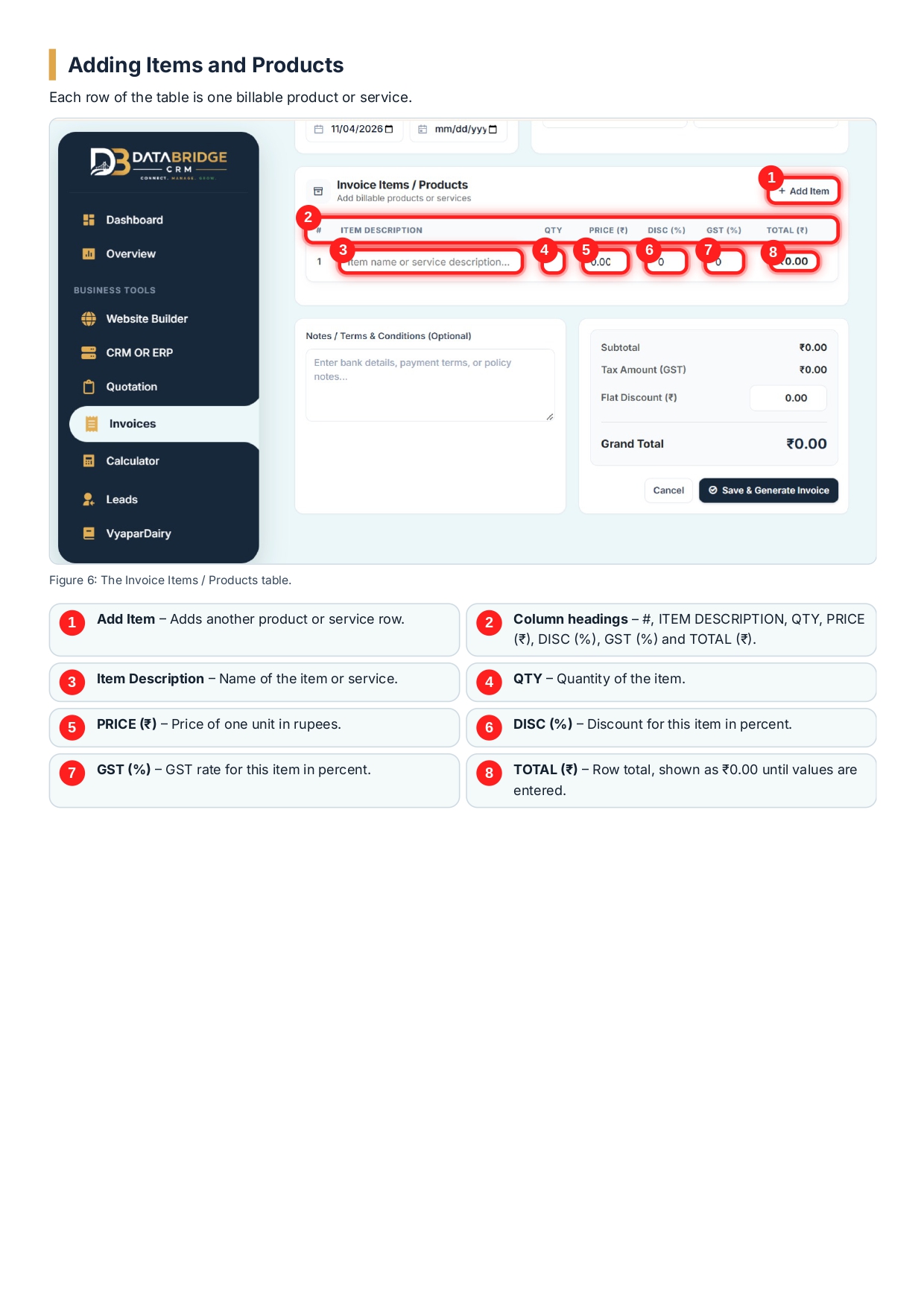
The middle section of the form houses the billable items table. Each row represents an individual product or service supplied.
- Click the
+ Add Itembutton in the top right corner of the table to insert additional product rows. - Fill out the line-item columns:
- Item Description: Clear title or narrative of the product/service rendered.
- Quantity (QTY): Total number of units supplied.
- Price (₹): Base price per individual unit in Rupees.
- Discount (DISC %): Applicable item-level percentage discount.
- GST (%): Applicable Goods and Services Tax rate percentage.
- Total (₹): System-calculated row total based on Quantity, Unit Price, Discount, and Tax inputs.
Phase 4: Terms, Discounts, and Finalizing the Grand Total
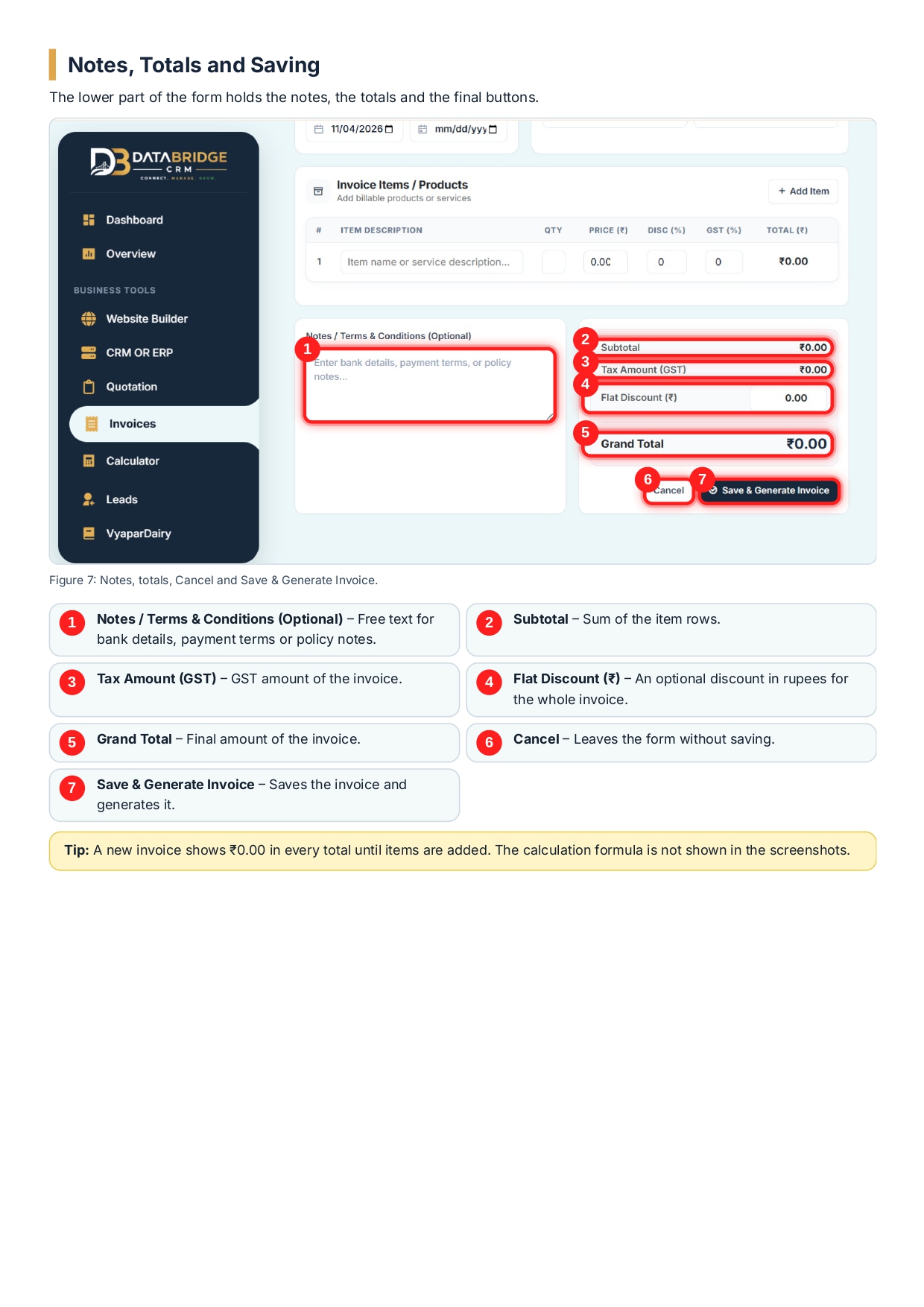
The bottom area of the invoice workspace handles payment terms, secondary discounts, and invoice generation.
- Notes / Terms & Conditions (Optional): Input bank account details, payment terms, UPI IDs, or company policy notes in the open text field.
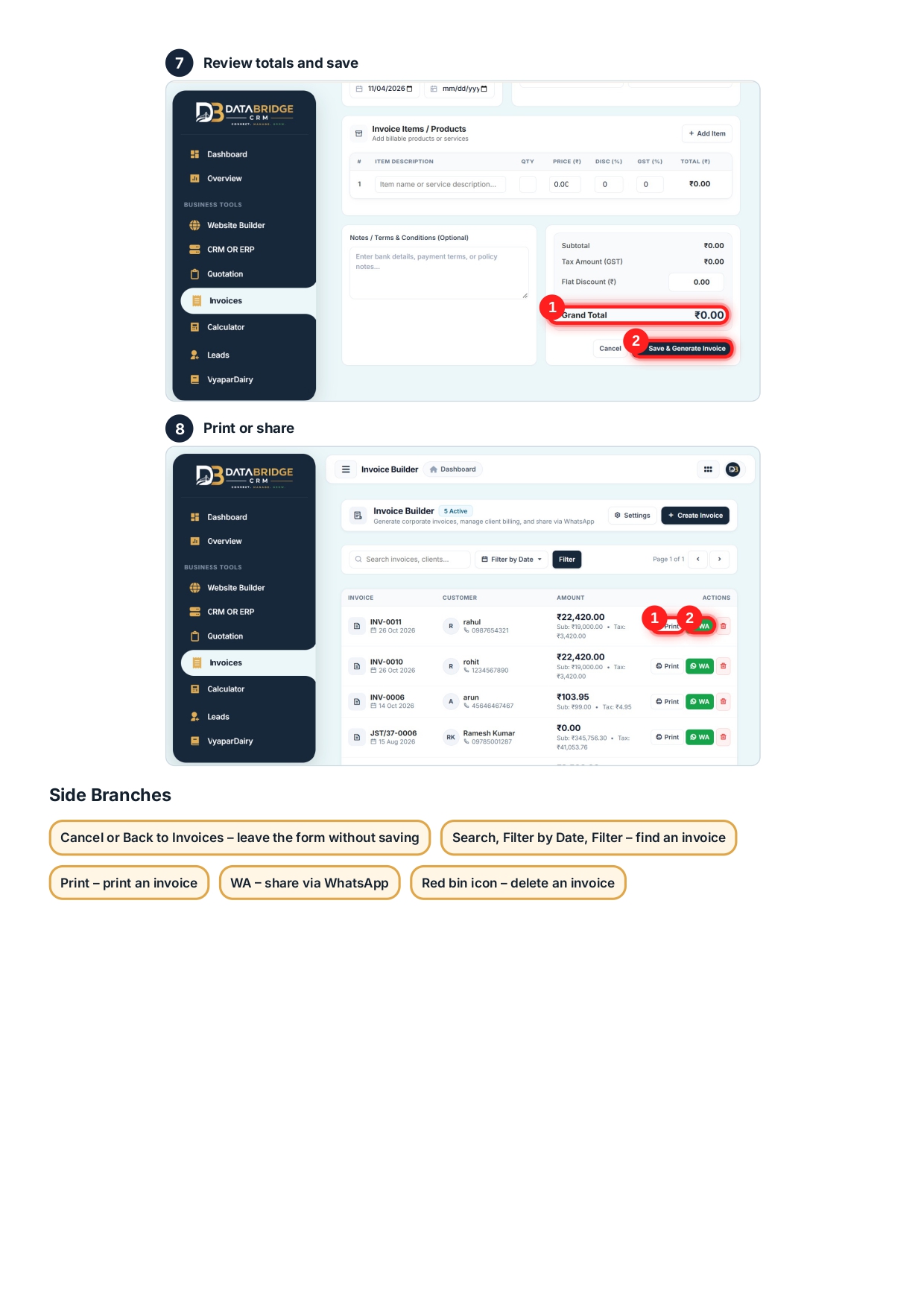
- Subtotal Summary: Displays the sum total of all line items before taxes.
- Tax Amount (GST): Summarizes the cumulative GST value calculated from item-level percentages.
- Flat Discount (₹): Enter an additional fixed discount in Rupees applied across the whole invoice.
- Grand Total Formula:
Grand Total = Subtotal + GST Tax Amount - Flat Discount - Click
Save & Generate Invoiceto lock the entries and publish the active invoice record.
Managing Your Invoices: Search, Actions, and WhatsApp Distribution
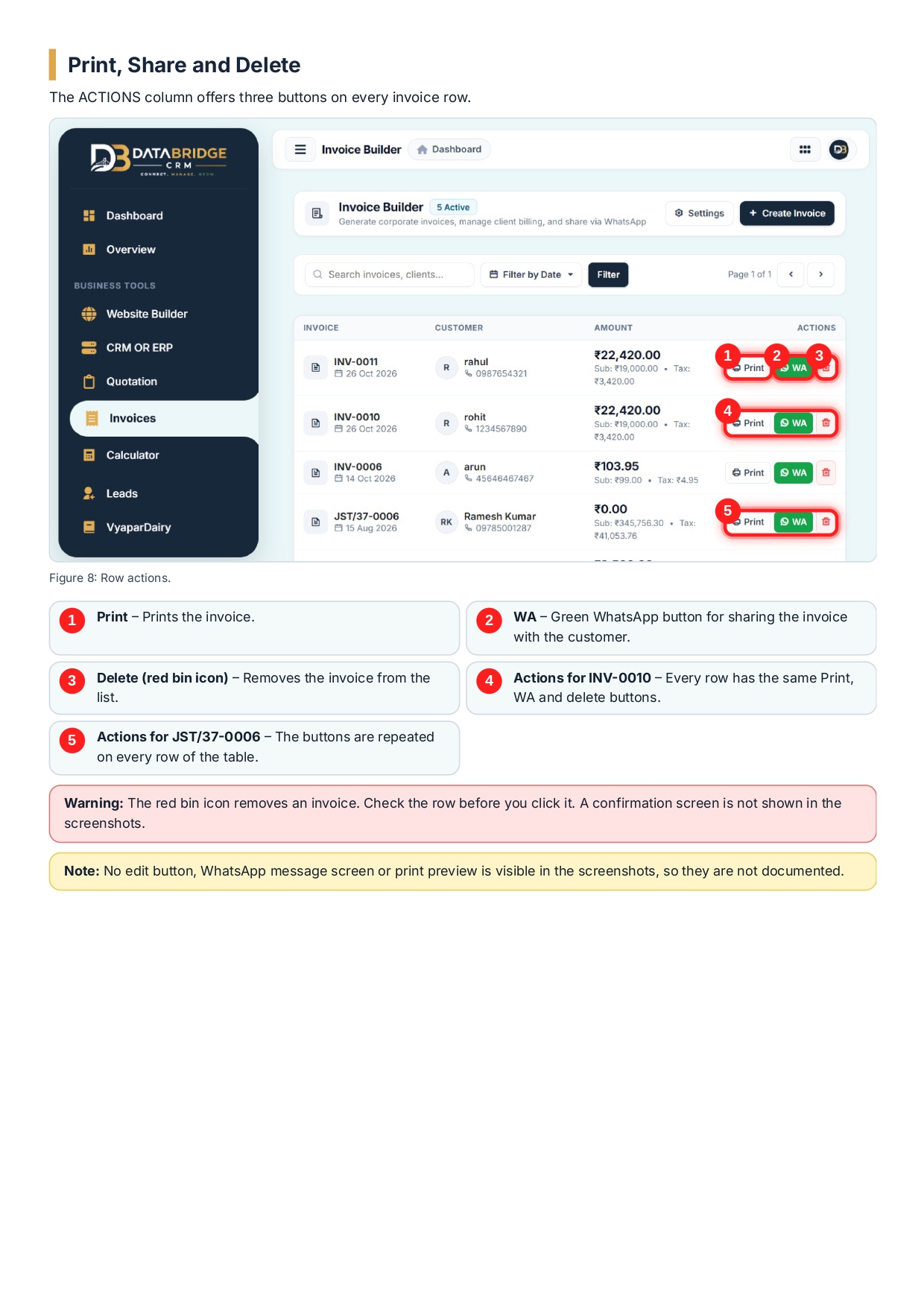
After an invoice is saved, it appears immediately on the main Invoice Builder Table.
List Navigation Controls:
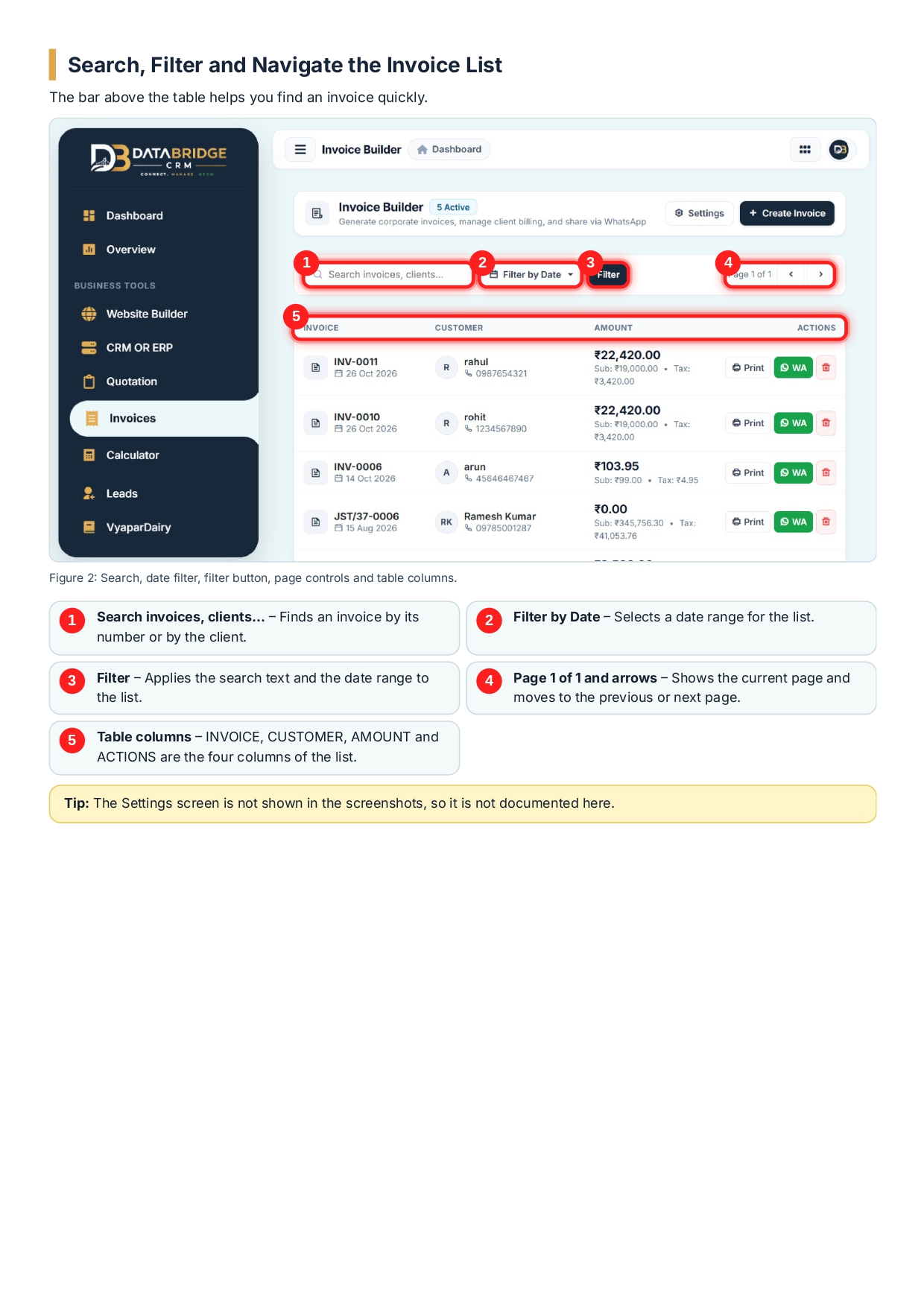
- Search Bar: Quickly locate an invoice by typing the invoice number or client name.
- Filter by Date: Filter your complete billing ledger by specific date ranges.
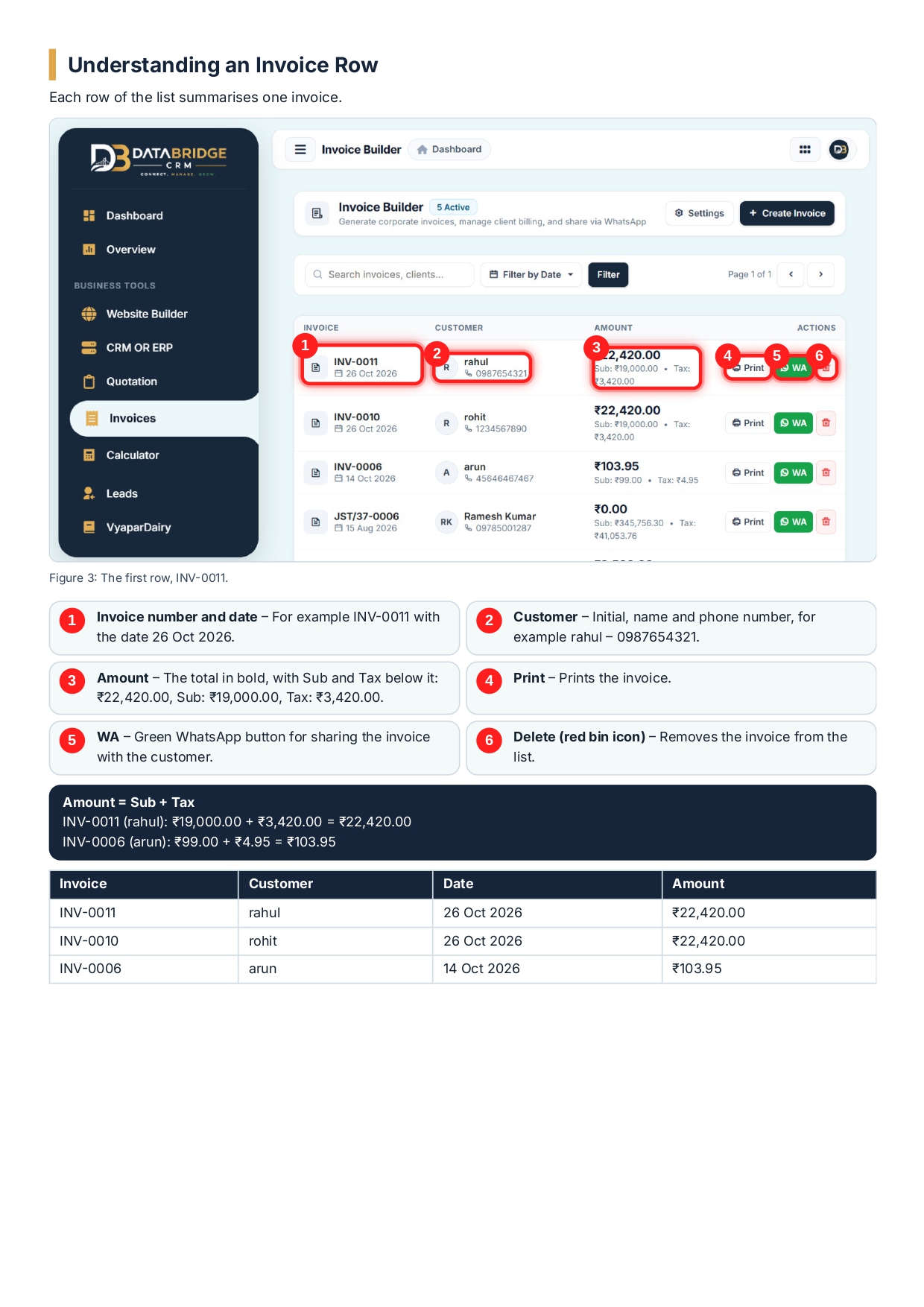
- Row-Level Actions:
- Print Button: Generates a clean, print-ready document or PDF version for physical records.
- Green WhatsApp Button (
WA): Opens WhatsApp to send the invoice breakdown and summary link directly to the customer's phone number. - Delete (Red Bin Icon): Permanently removes the invoice record from the system ledger. (Note: Ensure records are verified before clicking delete.)
Why Local Businesses and Agencies Trust DataBridge CRM
Whether you run an agency in Jaipur, manage retail distribution across Rajasthan, or manage remote corporate accounts across India, DataBridge CRM Solutions simplifies your operational overhead. By unifying customer tracking, lead management, website building, and automated invoicing under one roof, your business stays organized, tax-compliant, and focused on revenue growth.
For complete CRM tutorials, software documentation, and billing management tools, visit DataBridge CRM Portal today.
Related Search Tags and Keywords
#DataBridgeCRM #InvoiceBuilder #GSTInvoicingSoftware #WhatsAppInvoicing #CorporateBillingSystem #AutomatedInvoicing #JaipurCRM #SmallBusinessBilling #CRMInvoiceManagement #TaxInvoiceGenerator #ClientBillingAutomation #CloudInvoicing #CRMSoftwareIndia #BillingAndAccounting #DigitalInvoicing #BusinessAutomation #JaipurBusinessSoftware #BillingLedger #PDFInvoiceGenerator #SMEBillingSolutions

